Design a clean Etsy shop banner with templates, text, logos, photos and brand colors directly in your browser. Pixelixe helps you create storefront visuals that look consistent with the rest of your shop.
Use this page when you need an Etsy cover image, Etsy shop banner, or storefront header that introduces your brand clearly. Pixelixe can also help you create matching ecommerce banners, social posts, and other branded visuals around the same look.

Start with the Etsy banner preset so your canvas matches the expected shop cover size, or choose a custom format if you want a variation for a campaign or matching channel asset.
Choose an Etsy banner template as a starting point, or begin with a blank layout if you already know the exact style, logo placement, or messaging you want for your shop.
Adjust text, images, background and alignment until the banner fits your storefront branding, then download an Etsy-ready image you can upload directly to your shop.
Your Etsy banner is one of the first branded elements shoppers see when they land on your store. It sets expectations for product quality, style, and professionalism before they even scroll through your listings.
An Etsy banner, also called an Etsy cover photo, appears above your product listings on your shop homepage. A good banner helps communicate what your brand sells, what kind of aesthetic customers should expect, and whether the store feels consistent and trustworthy.
The banner also matters for brand consistency. If you promote products on Instagram, Pinterest, email, or ads, matching the style of your Etsy banner to your other visuals makes your shop easier to recognize across channels. You can use Pixelixe to create both the Etsy header and related campaign assets.
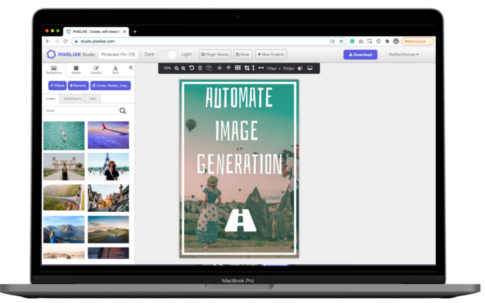
Open Pixelixe Studio and either select an Etsy banner template from the library or start from scratch with the Etsy banner preset. This gives you the right canvas size immediately, so you do not need to calculate dimensions manually before designing your shop cover.
You can upload your own images, product photos, or logos, or start from stock visuals available inside the editor.
To add your own photography or branded visuals, open the Background panel, choose Upload Yours, then drag and drop your file into the upload area. Your image will appear on the canvas immediately, ready for cropping, resizing, and styling inside the banner layout.
Inside Pixelixe Studio, you can combine product photos, shapes, icons, logos, and background visuals until the banner matches the personality of your Etsy shop. The editor is designed to stay approachable for non-designers while still giving enough control to create something polished and specific to your brand.
You can also use the rich text editor to add your shop name, a short tagline, a seasonal message, or a category cue. Font size, text color, opacity, font family, line height, letter spacing, shadow and more can all be adjusted to make the banner readable and visually balanced.

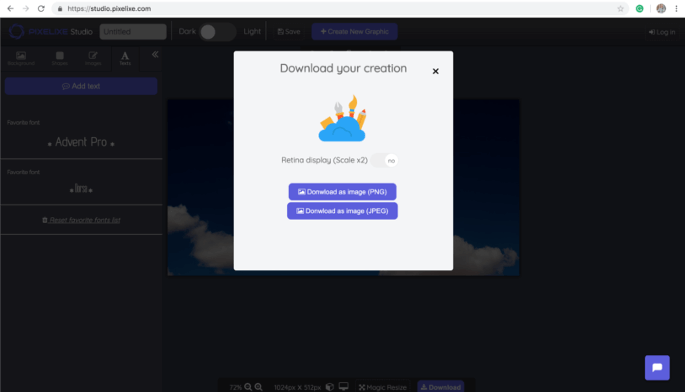
When the design looks right, click the Download button in the top-right corner of the editor. You can export the finished Etsy banner as PNG or JPEG and upload it directly to your shop. This keeps the workflow simple: design, export, upload, and publish.
Optimize your Etsy banner image with these dimensions: 1200 pixels wide by 300 pixels tall.
Etsy banners are available as a preset in Pixelixe Studio, so a single click creates the right canvas for your storefront header. That helps you avoid exporting the wrong size and keeps the banner ready for upload the first time.

A common Etsy banner size is 1200 pixels wide by 300 pixels tall, and Pixelixe includes Etsy banner dimensions as a ready-to-use preset.
Yes. Pixelixe provides templates, drag-and-drop editing, image uploads, and text styling tools so non-designers can create shop banners faster.
Yes. You can upload product photos, place your logo, add your shop name or tagline, and adjust colors and typography to match your Etsy branding.
Yes. Pixelixe can also be used for social posts, ecommerce banners, ads and other assets that you want to align visually with your Etsy storefront.
Pixelixe Studio will always let you (for free) create and download graphics and images and use them without any limitation. Our Studio has been designed to be ridiculously easy to use and the perfect utility tool for small businesses, marketers, bloggers with no design background.
No need to register to benefit from Pixelixe Creative Studio, we do not force you to sign in to try and love our amazing Studio app. Just click on this URL to create graphic right away https://studio.pixelixe.com. Don't forget to save this URL as a favorite in your browser, you will become addictive to it.
We do not collect your personal data at all. We developed Pixelixe Studio with the objective to make it as accessible as possible for everyone. We believe in freedom and we have no interest in your email address, we just hope that you will find our work useful and that you will come back.