

A marketplace data pipeline is an automated workflow that collects product data from sites like Amazon and eBay, cleans it, and turns it into charts and graphics your marketing team can use. To keep it from getting blocked, use official APIs first, send requests at a steady and polite pace, and watch for early warning signs like CAPTCHAs.
What Is a Marketplace Data Pipeline?
A marketplace data pipeline is a repeatable system that pulls product information from online marketplaces and delivers it in a form people can act on, such as price charts or competitor reports. It runs on a schedule, so nobody has to copy prices by hand.
Think of it as an assembly line for product information. Raw data goes in at one end, such as a competitor’s price, a product’s star rating, or its review count. At the other end, you get something your team can use, like a weekly chart showing which competitors cut their prices.
The real difference from manual research is consistency. A person checking prices once a month sees a single snapshot. A pipeline checking every day sees the full trend, which makes your marketing claims more accurate and easier to back up.
The four stages: collect, clean, analyze, visualize
- Collect: Pull prices, ratings, reviews, and sales rank.
- Clean: Remove duplicates and broken records.
- Analyze: Spot price drops or rising competitors.
- Visualize: Turn findings into charts and graphics.
Each stage feeds the next. If collection breaks, everything downstream goes stale.
Collection is the stage most likely to break, so most teams add proxies as their pipeline grows. Bright Data is one of the best-known proxy providers, with a large residential network and a full set of scraping tools. It’s a strong fit for big teams with enterprise budgets. Smaller marketing teams that prefer simple pay-as-you-go pricing can compare a Bright Data alternative that offers the same core proxy types.
Who uses it
E-commerce brands use it to track competitor pricing. SEO and content teams use it for original research that earns links. Marketers use it to automate visual content creation for campaigns, turning real numbers into comparison graphics and trend posts.
Why Marketplaces Block Automated Data Collection
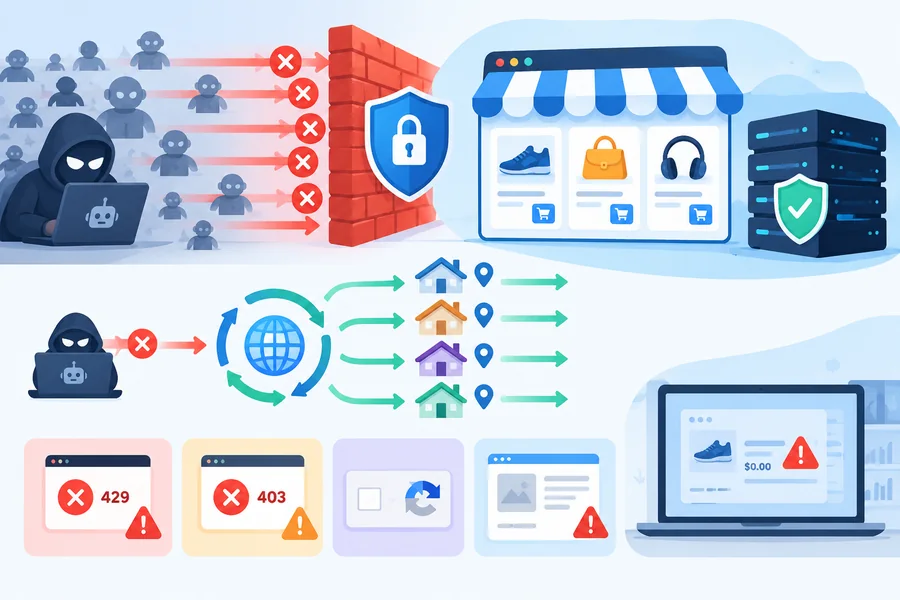
Marketplaces block bots to protect their servers and their data. Their systems spot automated traffic fast.
Most blocks start at the IP level, when one address sends far more requests than a real shopper would. Rotating residential proxies from a provider like FleetProxy.io spread that traffic across many home connections, so each IP stays within normal browsing patterns.
Common blocking signals: IP bans, CAPTCHAs, and rate limits
Watch for these warning signs:
- HTTP 429 errors: “Too many requests.” You’re going too fast.
- HTTP 403 errors: Access denied, often after your IP is flagged.
- CAPTCHAs: The site wants proof you’re human.
- Empty or fake pages: Some sites serve blank or dummy prices to suspected bots.
That last one is the most dangerous. Your pipeline keeps running, but your visuals show numbers that aren’t real.
Terms of service and legal boundaries to respect
Scraping public data is a legal gray area. In the hiQ Labs v. LinkedIn case, US courts suggested that scraping public pages likely doesn’t count as hacking under the Computer Fraud and Abuse Act. Yet hiQ was still found to have breached LinkedIn’s user agreement.
Read each marketplace’s terms and robots.txt, never scrape behind a login, and skip personal data like reviewer names. For commercial projects, check with a lawyer.
Step 1: Choose Your Data Source: Official APIs or Web Scraping
The safest pipeline never has to dodge blocks, so the marketplace API vs web scraping decision comes first.
Comparison: Amazon SP-API, eBay Browse API, and scraping
| Factor | Amazon SP-API | eBay Browse API | Web scraping |
|---|---|---|---|
| Who can use it | Sellers, vendors, approved developers | Registered eBay developers | Anyone with technical skills |
| Cost | Free; proposed 2026 developer fees were cancelled in May 2026 | Free with a developer account | Proxies, tools, and upkeep |
| Limits | Per-operation rate limits | Daily call limits per app | Whatever the site tolerates |
| Block risk | Very low | Very low | Medium to high |
| Data scope | Seller, catalog, and pricing data | Public listings and prices | Anything on the page |
Use an API when it covers your fields. Save scraping for gaps like review text.
Step 2: Collect Data Without Getting Blocked
To scrape marketplace data without getting blocked, behave like normal, polite traffic. Speed gets most pipelines caught.
Start with official APIs where possible
APIs publish their limits, so you always know where the line is. Use them first and scrape only what’s missing.
Pace your requests and respect rate limits
Add random delays of a few seconds between requests. Fixed timing is an easy bot signal. After a 429 error, wait before retrying and double the wait each time. This exponential backoff is the most useful habit for keeping a scraper alive.
Rotate IPs and request headers responsibly
Thousands of requests from one IP will get it banned. Rotating proxies send your requests through many addresses, and residential proxies use home connections, so they look like real shoppers. Keep total volume reasonable, though. Rotation isn’t permission to hammer a site.
Handle JavaScript-heavy product pages
Many product pages load prices with JavaScript, which a simple request won’t see. Playwright or Puppeteer open pages like a real browser but run slower, so use them only where needed.
Step 3: Clean and Structure the Data
Raw marketplace data is messy, and clean data is what makes your visuals trustworthy.
Removing duplicates, fixing prices, and standardizing formats
- Deduplicate using a stable ID like an ASIN (Amazon’s product ID) or eBay item ID, not the title.
- Fix prices by converting to one currency and storing them as numbers.
- Standardize dates and timestamp every record.
- Flag outliers like a $0 price, which usually signals a scraping error.
Python’s pandas library handles all of this. For smaller projects, a shared Google Sheet works fine.
Step 4: Turn Data Into Marketing Visuals
E-commerce data visualization works best when each chart answers one question. When creating marketing visuals from product data, pick the format that fits the story.
Which visual fits which data
| Data type | Best visual | Marketing use |
|---|---|---|
| Price over time | Line chart | Price-drop trend posts |
| Competitor prices | Horizontal bar chart | Comparison graphics for landing pages |
| Review ratings | Stacked bar of 1 to 5 stars | Trust and quality content |
| Category share | Treemap or bar chart | Market overview reports |
Tools to automate visual creation
Looker Studio refreshes charts automatically from Google Sheets. Plotly or Matplotlib can export chart images on a schedule. For branded social graphics and price-drop cards, an image automation API like Pixelixe can fill one approved template with each row of your product data, so every visual stays on brand.
Step 5: Automate and Monitor the Pipeline
Without monitoring, a pipeline fails silently. You only find out when a chart looks wrong.
Scheduling, alerts, and catching blocks early
Schedule runs with cron jobs or GitHub Actions. Daily is enough for most pricing data, and hourly runs raise block risk.
If 403 errors keep coming back even with slow pacing, your IP pool may be flagged. Switching to a fresh pool of rotating residential IPs can get collection running again without rebuilding the pipeline.
Set alerts for:
- Success rate drops below a set level
- A spike in 403 or 429 errors
- Fewer records than usual
- Empty price fields
Send alerts to Slack or email so one broken run never becomes a week of bad charts.
Common Mistakes That Get Pipelines Blocked

Most blocks come from a few avoidable habits:
- Requesting too fast. This is the clearest bot signal.
- Ignoring 429 errors. Instant retries turn a warning into a ban.
- Using one IP or one user agent. Every request looks like one machine.
- Relying on page layout without checks. A layout change breaks it silently.
- Skipping data validation. Decoy or blank pages slip into your charts as real numbers.
Pipeline Readiness Checklist
Tick every box before going live.
Source and compliance
- Checked whether an API covers your fields
- Read the terms and robots.txt, with no personal data collected
Collection
- Random delays and growing waits after errors
- Rotating IPs for any scraped pages
Data quality
- Deduplicated on a stable product ID
- Prices stored as numbers, every record timestamped
- Outlier and empty-field checks in place
Visuals and monitoring
- Charts refresh from the cleaned data
- Alerts set for error spikes and record drops
Conclusion
A marketplace data pipeline is only useful if it keeps running and stays accurate. The teams that get the most from it treat collection as the foundation. They start with official APIs, pace every request, and scrape only what the APIs can’t provide.
Clean data comes next. A single decoy price or duplicate listing can turn a good chart into a wrong claim, so validation matters as much as speed. Once the data is reliable, automated visuals let your team publish price trends, comparison graphics, and market reports without rebuilding them each week.
Finally, monitoring keeps the whole system honest. Simple alerts catch blocks and empty fields early, long before they reach a published post. Build these habits in from day one, and your pipeline will keep feeding your marketing with numbers you can trust.
