
Design.com Review 2026: Features, Pricing, and Is It Worth It?
Choosing a logo maker can be surprisingly difficult. You want something that looks professional, reflects your business, and offers enough flexibility to create a visual identity you can use across platforms. At the same time, you probably don’t want to spend hours learning complicated design software or hire a professional designer just to get started.
Design.com aims to make that process easier with an extensive library of professionally designed logo templates, AI-powered customization features, and additional branding tools. It allows users to create logos for practically any industry, customize their designs, and download high-resolution files without needing previous design experience.
But is Design.com actually worth using in 2026? We took a closer look at its logo creation process, customization options, AI features, pricing, and additional tools to see what it offers.
Design.com at a Glance
| Category | Details |
|---|---|
| Platform | Online logo maker and design platform |
| Best for | Entrepreneurs, startups, small businesses, and content creators |
| Logo templates | 500K+ |
| Total design templates | 1 million+ |
| Fonts | 750+, including 525+ exclusive fonts |
| Custom shapes | 62K+ vector shapes |
| AI features | AI Logo Generator, AI Icon Generator, AI Illustration Generator, AI Background Remover, and more |
| Additional tools | 50+ design and branding tools |
| Logo editing | Text, icon, color, typography, and AI chat-based editing |
| Download formats | SVG, EPS, PDF, PNG, JPG, GIF, and MP4 |
| Free option | Yes |
| Paid plans | Start at $3/month with annual billing |
| Trustpilot rating | 4.9/5 |
What Is Design.com?
Design.com is an online logo maker and branding platform that helps businesses create professional-looking logos and other visual materials. Its main offering is an extensive collection of logo templates created by professional designers, covering hundreds of industries and different visual styles.
Instead of starting with a blank canvas, users can browse existing designs, find concepts that align with their business, and customize details to suit their preferences.
The platform also incorporates AI into the design process. Its AI Logo Generator helps users explore logo concepts, while its AI editing features enable users to modify logo icons and text with simple instructions.
Design.com extends beyond logo creation. Once you have a logo, you can use the platform’s other tools to create business cards, social media graphics, flyers, posters, presentations, websites, and other branded materials.
This makes it a practical option for businesses that want to establish a consistent visual identity without managing several different design subscriptions.
Design.com Features: What Do You Get?
We looked at the platform’s main features to assess their usefulness for creating a logo and developing a complete brand identity with AI.
1. Extensive Logo Template Library
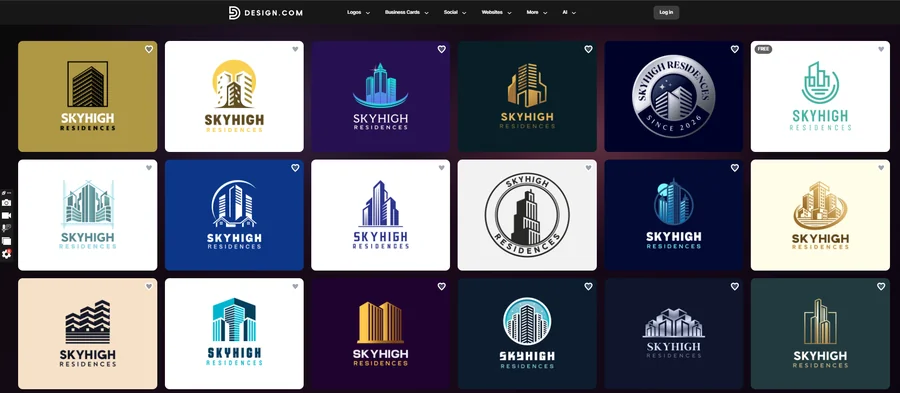
One of the first things that stands out about Design.com is the size of its logo library.
With more than 500,000 logo templates and over 1 million design templates in total, there are plenty of starting points to explore. Whether you’re opening a restaurant, launching a clothing label, starting a technology company, or setting up a local service business, you can browse designs created for different industries.
The templates are professionally designed and exclusive to Design.com. This gives users access to a wide selection of original concepts rather than relying entirely on generic symbols and layouts.
We particularly like that the library caters to different visual preferences. You can look for minimalist wordmarks, colorful illustrated logos, sophisticated emblems, modern corporate designs, and other styles.
Another useful detail is that the designs are intended to be market-ready, often requiring little to no editing before use. Of course, you’ll still want to personalize your chosen design so it reflects your business rather than simply using a template unchanged.
Why it matters: A large template library gives you more opportunities to find a design that feels appropriate for your business. It also saves time compared with building a logo entirely from scratch.
2. AI Logo Generator
Design.com’s AI Logo Generator is another major feature worth exploring.
It gives users another way to discover logo concepts, particularly when they’re unsure what direction they want to take. Instead of spending time browsing hundreds of unrelated designs, you can use the AI generation experience to explore ideas based on your creative brief.
The platform also provides a separate Logo Maker experience where you can enter your business name, add relevant keywords, and use available filters to find suitable designs.
This distinction is useful because you have multiple ways to approach logo creation. You can explore AI-generated concepts or browse and customize existing templates.
You can then narrow down the visual direction and select a design that matches your business’s personality.
Why it matters: The combination of AI-assisted concept generation and a large template library gives users more flexibility when deciding how their logo should look.
3. AI-Powered Logo Editing
Finding a suitable logo is only part of the process. You also need to make sure the final design represents your business.
This is where Design.com’s AI editing features become particularly useful.
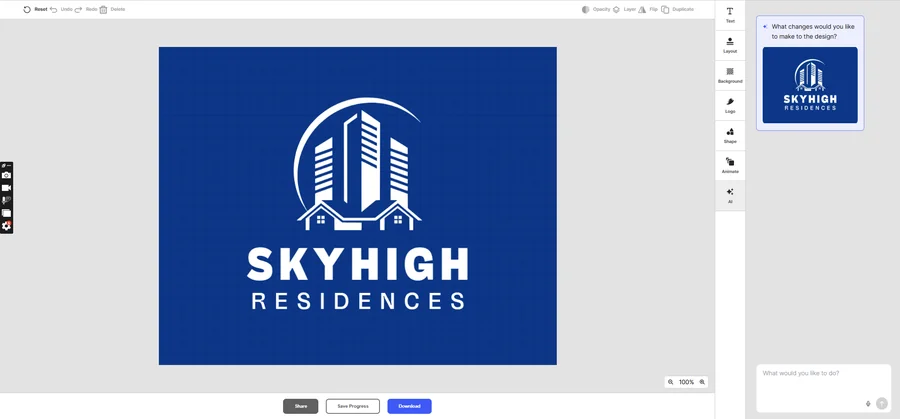
The platform allows users to edit logo icons and text using AI, with a simple chat interface for requesting changes. Rather than relying exclusively on manual adjustments, you can describe what you want to change and let the AI assist with the editing process.
For example, if you’ve chosen a logo with a detailed illustration but want something simpler, you can request a cleaner icon. You can also use the AI chat interface to communicate other changes to your design.
Design.com uses custom-trained AI for its logo editing experience, with a focus on copyright-safe editing.
This is a useful addition because it gives users another way to personalize their chosen design without needing advanced illustration skills.
Why it matters: AI editing makes logo customization more approachable, especially for people who know what they want to change but aren’t familiar with professional design software.
4. Customization Options and Design Elements
Design.com offers plenty of ways to personalize your chosen logo.
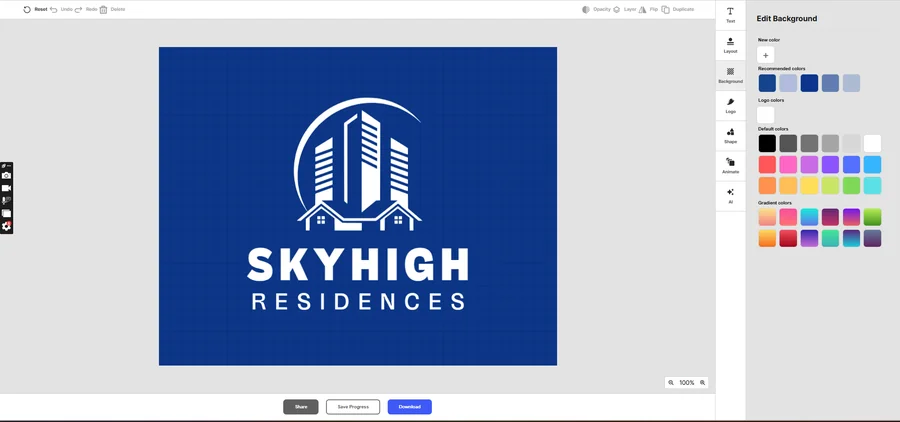
You can work with different fonts, colors, shapes, icons, and other visual elements to create a design that suits your brand.
The platform includes more than 750 fonts, with over 525 exclusive fonts, giving you a broad selection of typography styles. You can choose something bold and contemporary, elegant and understated, playful, or more traditional.
Its library also includes over 62,000 custom vector shapes, providing additional creative options when building or refining a logo.
These elements are important because small changes in typography, spacing, and color can significantly affect how a logo looks.
For example, a luxury skincare business might benefit from elegant typography and a restrained color palette, while a children’s clothing brand could use brighter colors and more playful visual elements.
Why it matters: The combination of fonts, shapes, and icons gives users room to personalize a template instead of settling for a design that looks like every other business in the same industry.
5. Logo Designs for Different Industries
A logo should reflect the type of business it represents. A restaurant, a financial consultancy, a fitness studio, and an online clothing store will naturally have different visual requirements.
Design.com addresses this by offering an extensive collection of industry-specific logo templates.
You can explore designs suitable for:
- Restaurants, cafes, and food businesses
- Fashion and clothing brands
- Beauty salons and skincare companies
- Technology and software businesses
- Real estate agencies
- Fitness studios and sports brands
- Construction and home services
- Education and professional services
- Retail stores and e-commerce businesses
Having templates across different industries makes the browsing process more relevant. You can focus on designs that suit your business rather than sorting through concepts that have little connection to your industry.
Why it matters: Industry-specific designs provide a useful starting point, particularly if you’re creating your first business logo and aren’t sure which visual direction to choose.
6. High-Quality Logo Downloads and File Formats
Once you’re happy with your logo, you’ll want to download files that work across different applications and platforms.
Design.com provides several file formats, including vector and raster options.
Here’s what you can expect:
| Format | Common use |
|---|---|
| SVG | Websites, digital graphics, and scalable designs |
| EPS | Professional printing and vector editing |
| Sharing, printing, and document use | |
| PNG | Websites, presentations, and social media |
| JPG | General digital use |
| GIF | Animated digital graphics |
| MP4 | Animated logo content and video use |
You can also download icon-only versions and choose transparent backgrounds where available.
We consider this an important feature because a logo needs to work in different environments. You might use a full logo on your website, an icon-only version as a social media profile picture, and a vector file for printed materials.
Having access to multiple formats makes it easier to maintain a consistent brand identity.
7. Extended Logo Licenses
Design.com also offers extended licenses for customers who want exclusive use of a particular logo.
With an extended license, customers can have the logo template removed from the platform’s library, providing an additional level of exclusivity.
This is worth considering if you’re building a business that plans to invest heavily in its brand identity.
A standard template-based logo can be a convenient and affordable starting point, but businesses that want a more exclusive design may prefer to explore the extended licensing option.
Why it matters: It gives businesses an option to obtain a greater degree of exclusivity rather than relying on a template that remains available in the library.
8. More Than 50 Additional Design Tools
This is one of Design.com’s strongest advantages over a basic logo maker.
The platform includes more than 50 additional design and branding tools, allowing users to create other materials that support their business.
These include:
- Business cards
- Digital business cards
- Websites
- Social media posts and stories
- Presentations
- QR codes
- Flyers
- Posters
- Letterheads
- Menus
- Link-in-bio pages
The tools are useful when you’re ready to start applying your new logo across different customer touchpoints.
For example, after creating a logo for a new restaurant, you could use Design.com to prepare a menu, business cards, social media posts, and promotional flyers.
Another feature worth mentioning is automatic template branding. Social, print, and web templates can automatically inherit your logo colors, helping maintain a consistent appearance across your designs.
You can also register a domain name alongside your logo, making it easier to establish your business’s online presence.
Why it matters: You don’t have to treat your logo as a standalone project. You can continue developing your brand materials within the same platform.
9. Free Logos and Design Tools
Not everyone is ready to pay for a logo, particularly when starting a new business.
Design.com offers a free tier that includes logo downloads in high-resolution and vector formats.
Downloading a free logo also gives you access to:
- Free website builder
- Free link-in-bio creator
- Free digital business card maker
- More than 50 design tools
- Free publishing for supported templates
One important distinction is that while users can access the additional design tools, downloading designs created with those tools requires a premium subscription.
Still, the free logo option is a useful way to get started without an upfront subscription cost.
10. Printing and Customer Support
Design.com also offers printing options for businesses that want to put their logos on physical products.
You can have your designs printed on items such as:
- Business cards
- Cups and mugs
- T-shirts and caps
- Mousepads
- Other branded merchandise
The platform offers free delivery for printing orders, which is a useful addition when preparing physical branding materials.
For customer assistance, Design.com provides 24/7 email support and chat support.
There are also a couple of smaller features worth mentioning. You can save favorite logo designs to revisit later and create voting polls to share logo ideas with colleagues, friends, or other people involved in the decision.
This makes it easier to compare several concepts and gather feedback before choosing a final design.
Design.com Pricing: How Much Does It Cost?
One of the things we like about Design.com is that you don’t need to commit to a paid subscription immediately. There’s a free option, and the paid plans start at a relatively low price.
Here’s a breakdown of the available logo plans.
| Feature | Free | Starter | Value | Premium |
|---|---|---|---|---|
| Monthly price (annual billing) | $0 | $3 | $4 | $5 |
| Monthly price (monthly billing) | $0 | $9 | $14 | $19 |
| Free logo downloads | Yes | Yes | Yes | Yes |
| High-resolution and vector files | Yes | Yes | Yes | Yes |
| Unlimited logo changes | Yes | Yes | Yes | Yes |
| Logo ownership forever | No; paid-plan subscription required | Yes | Yes | Yes |
| Business cards and social posts | Access to tools | Yes | Yes | Yes |
| 50+ design tools | Yes | Yes | Yes | Yes |
| Website builder | Free version | No | Yes | Yes |
| Link in bio | Free version | No | No | Yes |
| Digital business cards | Free version | No | No | Yes |
Free Plan: $0
The free tier is a good starting point if you want to create and download a logo without paying for a subscription.
It includes high-resolution and vector logo downloads, access to the free website builder, link-in-bio creator, and digital business card maker.
You can also access more than 50 design tools and publish supported templates for free.
However, downloading designs created using the additional design tools requires a premium subscription.
Starter: $3/Month (Billed Annually) or $9/Month
The Starter plan is the most affordable paid option.
It includes:
- Your logo forever
- Cancel anytime
- High-resolution and vector logo files
- Unlimited logo changes
- Business cards
- Instagram and Facebook posts
- Email signatures
- Letterheads
- More than 50 additional design tools
- Access to the paid template bundle
This plan is a good fit if your main priority is getting a professional logo and creating essential branded materials.
Value: $4/Month (Billed Annually) or $14/Month
The Value plan includes everything in the Starter plan, plus website-building capabilities.
You get:
- Everything in Starter
- Website builder
- Access to website templates
- Additional design and branding resources
I’d recommend this option for businesses that want to establish a basic online presence alongside their logo and other branding materials.
Premium: $5/Month (Billed Annually) or $19/Month
Premium is the most comprehensive logo plan.
It includes everything in Value, plus additional tools to manage your online presence and digital business identity.
Additional features include:
- Link-in-bio creator
- Digital business cards
- Website builder
- All Starter and Value features
This plan is particularly useful for entrepreneurs and small businesses that want several branding tools under one subscription.
Which plan should you choose?
For someone who only needs a logo and basic branding materials, Starter should be enough. If you also need a website, Value is worth considering. Premium makes more sense if you plan to use the link-in-bio and digital business card features as well.
The main advantage is that you can choose based on the tools you actually need rather than paying for a larger package from the beginning.
Pros and Cons of Design.com
After looking at its features, pricing, and broader design ecosystem, here’s how we’d summarize the platform.
Pros
- Huge logo library: More than 500,000 logo templates provide plenty of options across different industries.
- Professionally created designs: Templates are designed to be market-ready and often need little customization.
- AI logo generation and editing: AI features make it easier to explore concepts and request changes to logo icons and text.
- Extensive customization: More than 750 fonts and 62,000 custom vector shapes offer ample creative flexibility.
- High-quality downloads: Access to SVG, EPS, PDF, PNG, JPG, GIF, and MP4 formats.
- Free logo downloads: Users can get a logo without committing to a paid plan.
- 50+ additional design tools: Create business cards, flyers, posters, presentations, social media graphics, and more.
- Consistent branding: Templates can automatically inherit your logo colors.
- Affordable paid plans: Subscriptions start at $3 per month, billed annually.
- Extended licensing: An option is available for customers who want exclusive use of a logo design.
- 24/7 support: Email and chat support are available.
Cons
- No native app yet: Design.com has no dedicated app yet and can only be used through the web
Who Should Use Design.com?
Design.com is suitable for several types of users, particularly those who want to create a professional logo without hiring a designer.
Here’s who we think would benefit most.
Small business owners
If you’re launching a new business, Design.com provides a convenient starting point for building your visual identity. You can create a logo, prepare business cards, design social media graphics, and develop other branded materials from one platform.
Entrepreneurs and startups
Startups often need to establish a brand while managing a limited budget. The free logo option and affordable paid subscriptions make Design.com worth considering, particularly if you need several types of business materials.
Freelancers and independent professionals
Freelancers can use the platform to create a personal brand, design business cards, prepare presentation materials, and develop a consistent online presence.
Content creators and online businesses
The social media tools, link-in-bio creator, digital business cards, and other design features make it useful for people building an online audience or promoting products and services.
People without design experience
You don’t need professional graphic design skills to use Design.com. Its templates, customization options, and AI editing tools provide a more approachable way to create and refine a logo.
Final Thoughts
Design.com is one of the strongest options to consider if you’re looking for an affordable, feature-rich logo maker in 2026. It’s particularly appealing to small businesses, startups, and entrepreneurs who want to create a logo and develop their wider brand identity without juggling multiple design platforms.
If you want a straightforward way to turn a business idea into a complete collection of branded materials, Design.com is definitely worth trying.
Frequently Asked Questions
Is Design.com a good logo maker?
Yes. Design.com offers a large library of professionally created logo templates, AI-powered logo generation and editing, extensive customization options, and high-resolution downloads. It is particularly useful for entrepreneurs and small businesses that want to create a logo without professional design experience.
Is Design.com free to use?
Design.com offers a free tier that includes logo downloads in high-resolution and vector formats. Users also get access to a free website builder, link-in-bio creator, digital business card maker, and more than 50 design tools. However, downloading designs created using the additional design tools requires a paid subscription.
How much does Design.com cost?
Design.com has three paid logo plans: Starter at $3 per month, Value at $4 per month, and Premium at $5 per month when billed annually. Monthly billing costs $9, $14, and $19, respectively.
Can I edit my logo after creating it?
Yes. Design.com allows unlimited logo changes with its paid plans. You can customize design elements and use AI editing features to modify logo icons and text through a chat-based interface.
Can I use my Design.com logo for commercial purposes?
Design.com states that its designs are commercially safe to use and are checked for originality and quality. It also offers extended licenses for customers who want a template removed from the library and exclusive use of their selected logo. Review the applicable license terms for your intended use.
What file formats does Design.com support?
Design.com supports downloads of SVG, EPS, PDF, PNG, JPG, GIF, and MP4. You can also access icon-only versions and transparent background options.
Does Design.com offer more than logo creation?
Yes. Design.com includes more than 50 additional design and branding tools. These cover business cards, websites, social media posts, presentations, flyers, posters, QR codes, letterheads, menus, and other materials.
Can I create a website with Design.com?
Yes. Design.com includes a website builder. A free version is available, while the Value and Premium paid logo plans include website-building capabilities.
Does Design.com have an AI logo generator?
Yes. Design.com offers an AI Logo Generator alongside its template-based Logo Maker. It also includes AI editing features that allow users to request changes to logo icons and text through a simple chat interface.
Who is Design.com best for?
Design.com is best suited to entrepreneurs, startups, small business owners, freelancers, and content creators who want an accessible way to create a logo and produce additional branded materials. Its combination of templates, AI tools, and design features makes it useful for people who want to manage several aspects of their visual identity in one place.
Once the logo is approved, test it on the smallest campaign placement before exporting the rest. A wordmark that reads well on a website header may disappear on a mobile banner. When building reusable campaign templates, give that smaller format its own approved logo treatment so the next offer can change without another round of manual resizing.