Marketing teams create more content today than many entire departments produced a few years ago. But a surprising amount of it has nothing to do with creativity. The actual creative work might take an hour. Managing everything around it can take the rest of the day. A creative management platform provides one such system that clears out these coordination challenges.
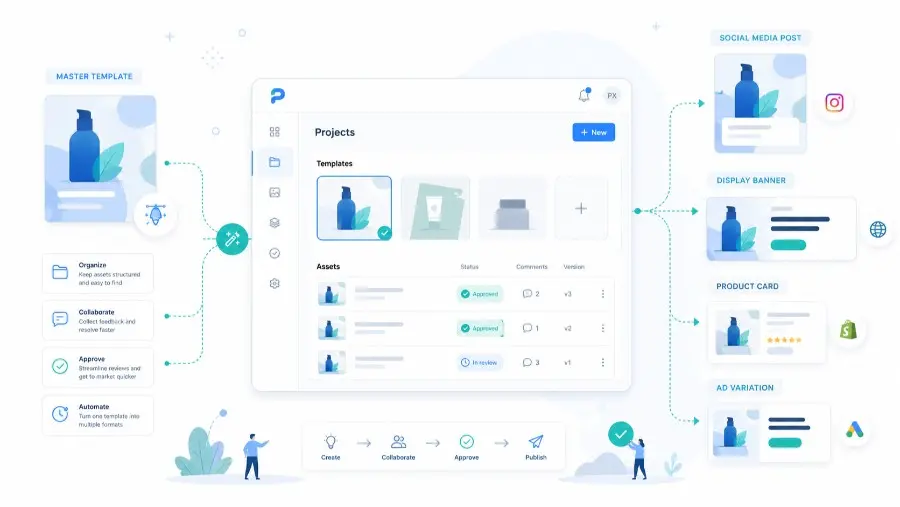
A creative management platform, or CMP, helps teams centralize creative production, organize campaign assets, automate visual variations, manage reviews, and distribute final assets across marketing channels. It is especially useful when a team produces many versions of the same visual for ads, social media, ecommerce pages, emails, or localized campaigns.
For teams producing branded visuals at scale, the real value is not only storage or collaboration. The value comes from connecting templates, brand rules, approval workflows, and automated image generation into one repeatable system. This is where creative management overlaps with creative automation and API-based visual production.
Intrigued? Good, because there is more coming up next. We will show you what a creative management platform is and how to decide if your workflow has reached the point where adding one makes sense. We will also give you steps for implementing one, so you can actually put it into use.
What Is a Creative Management Platform?
A creative management platform is software that centralizes how marketing creative gets produced, reviewed, and distributed. It replaces the manual process of building ad variations one file at a time with template-based production that generates multiple versions from a single design.
In simple terms, a CMP gives marketing teams one operational layer for creative work: briefs, templates, assets, feedback, approvals, exports, and performance signals. Instead of managing creative production through disconnected folders, spreadsheets, email threads, and design files, teams use a shared system where each asset has a clear status, owner, version, and destination.
The category covers tools that handle asset organization alongside version control. They also manage approval workflows and creative performance data.
Most platforms connect to the ad networks and design tools your team already uses. The global creative management platform market was valued at $1.2 billion in 2025 and is projected to reach $2.29 billion by 2034. That growth rate shows how many marketing teams are moving away from manual creative production.
A useful way to understand the category is to compare a CMP with the tools marketing teams already know:
| Tool type | Main purpose | Best for | Limitation |
|---|---|---|---|
| Design tool | Creating individual visuals | Original design work and layout creation | Usually not built for large-scale versioning, approvals, and distribution |
| Digital asset management system | Storing and organizing files | Asset libraries, metadata, and reuse | Often lacks production automation and campaign workflow features |
| Project management tool | Tracking tasks and deadlines | Planning, ownership, and team coordination | Does not usually generate or manage creative variants directly |
| Creative management platform | Managing creative production from template to launch | Multi-format campaigns, brand governance, approvals, and scalable asset production | Requires workflow setup before the full value appears |
| Creative automation platform | Generating many branded variations from templates or APIs | Dynamic banners, ecommerce visuals, localized assets, and bulk image generation | Needs strong templates and clean input data |
For many teams, the strongest setup combines a CMP with automation. The CMP governs the workflow, while tools like Pixelixe image automation generate the actual creative variants from reusable templates.
5 Core Features of a Creative Management Platform
Not every tool that calls itself a CMP includes all five of these. But these are the features that separate a real creative management platform from a design tool with a collaboration feature added on.
1. Asset Organization and Version Control
A CMP stores every version of every creative asset in one place. When someone updates a banner, the previous version stays accessible. When a campaign runs across 8 markets, each localized version stays under the same parent asset instead of being split between individual folders.
Version history removes the “which file is the final one” problem. The platform tracks who changed what and when. And if a stakeholder asks six months from now why a headline was updated mid-campaign, the edit log has the answer.
This matters even more when a single campaign has dozens of derived assets: square posts, story formats, display ads, email headers, product cards, retargeting banners, marketplace images, and localized variants. Without structured version control, teams often end up with duplicated files that look almost identical but contain different copy, prices, product images, or legal disclaimers.
2. Real-Time Collaboration Tools
Designers, copywriters, brand managers – they all work on the same asset at the same time and a CMP lets them collaborate smarter. Comments are pinned to a specific element on the creative itself, not in a separate email thread. A copywriter can flag a headline directly on the banner where it appears.
That in-context feedback cycle cuts revision cycles. The designer sees the note right where the change needs to happen. No interpreting written descriptions of “the text in the upper left area” from a Slack message sent three hours ago.
Good collaboration features also reduce unnecessary meetings. When feedback is attached to the asset, the team does not need a separate alignment call just to understand which version, placement, or visual element someone is talking about.
Creative collaboration also involves the documents behind each campaign, including PDF briefs, brand guidelines, and product sheets. For teams building or extending a CMP, embedding a javascript document viewer such as Apryse WebViewer allows stakeholders to view and annotate these materials directly within the application. A brand manager could flag outdated messaging in a brief before it reaches the design team, while a marketer could highlight product details that need correcting before generating visual variations. Connecting document review with template-based creative production helps teams resolve issues at the source before repeating them across banners, social posts, and localized campaign assets.
3. Approval Routing Systems
A CMP routes creative through a defined approval chain before anything goes live. The legal team sees compliance-sensitive ads. The brand team reviews visual identity. The campaign manager gives final sign-off. Each step is tracked.
Manual approval usually means emailing a PDF and waiting for a reply. That process breaks when ten versions need review across three approvers. Brand governance features inside a CMP replace that email chain with a structured queue where each reviewer sees only what they need to review.
Approval routing is also a brand protection layer. It makes sure that regulated claims, promotional deadlines, campaign prices, partner logos, and regional disclaimers are reviewed before publication, not after a live ad has already been spotted with an issue.
4. Creative Performance Tracking
Most design tools tell you nothing about how the finished creative performed after it launched. A CMP connects production data with performance insights to help you identify high-performing creatives. You can see which rich media or banner variant had the highest click-through rate. You can also see which headline version drove the most conversions.
That connection between what was produced and what worked is what makes the next campaign’s creative decisions better. Without it, the team is assuming which version performed best based on overall campaign numbers that don’t break down by individual creative.
Performance tracking is especially useful when teams run structured creative testing. If each variation is generated from a template with controlled changes, marketers can compare images, headlines, product angles, call-to-action text, or offer framing with more confidence.
5. Integrations With Marketing and Design Tools
A CMP connects to the tools your team already uses. Ad platforms like Google Ads and Meta Ads Manager receive finished creative directly from one unified platform. Design tools like Figma or Photoshop feed into the CMP through import workflows. API connections let development teams automate creative production programmatically.
The integration layer is what makes a CMP operational instead of just another place to store files. If the platform doesn’t connect to where ads get published, the team still has to download and re-upload manually – which eliminates most of the time savings.
For teams with technical resources, APIs are often the difference between a useful CMP workflow and a scalable creative production system. An API can generate thousands of branded visuals from product feeds, spreadsheet rows, customer segments, local store data, or campaign variables. That is why CMP adoption often becomes more valuable when it is connected to template-based image generation and automated export workflows.
Why Modern Marketing Teams Are Adopting Creative Management Platforms: 4 Distinct Benefits
The five features above explain what a CMP does. These four benefits explain why marketing teams decide the investment is worth it.
1. Standardized Workflows That Keep Creative Processes Consistent Across Projects
Without a CMP, every campaign follows whatever process the project lead prefers. One manager uses a spreadsheet to track deliverables. Another uses Slack threads. A third stores files locally and shares them at the end. That inconsistency creates problems when team members switch between projects or when a new hire joins.
A CMP gives every project the same structure. Briefs go in the same place. Reviews follow the same steps. The process doesn’t change based on who is leading the project that week.
According to Storyteq’s published case data, Heineken cut digital content production costs by 40% using creative automation tools, and a standardized workflow was the foundation that made that creative automation possible.
This consistency becomes critical during large-scale updates where every product page needs to reflect the same brand system at the same time. Without a centralized structure, teams roll out changes in phases, which leads to mismatched visuals across live pages and broken brand continuity during the transition period.
Brondell under-counter water filters are a great example here. They ran into this during a full catalog-wide visual rebrand across their BigCommerce store. The update included new product photography standards and a refreshed color system across hundreds of SKUs.
The challenge wasn’t design work. It was execution speed across 200+ live product pages without taking the store offline or updating pages manually one by one. So the team loaded the new brand system into a CMP as locked templates tied to product page modules.
Every page element – headers, lifestyle banners, product callouts – was rebuilt from those templates instead of standalone files. When the rebrand launched, all 200+ pages were updated in a single coordinated release and kept the layout structure consistent across desktop and mobile without staggered rollouts or version mismatches.
Brondell reported a significant increase in search revenue after the rebrand went live, alongside a 94% improvement in search conversion rate.
The broader lesson is simple: a CMP becomes valuable when consistency is no longer a design preference but an operational requirement. When every market, product page, ad format, and promotion needs to follow the same brand system, manual coordination becomes too fragile.
2. Easier Repurposing of Existing Creative Assets for New Campaigns
Most marketing teams recreate assets from scratch for every campaign because finding and adapting older versions takes longer than starting over. A CMP with proper asset organization makes previous campaign materials searchable and editable. A banner from Q1 can become the starting point for a Q3 campaign in minutes instead of hours.
That lowers production costs and saves time across the year. A team running multiple campaigns per quarter that reuses 30% of their assets instead of rebuilding everything is reclaiming days of designer time per quarter. That is the time the design team redirects to new concepts rather than re-exporting old ones at different sizes.
This becomes especially important in high-SKU eCommerce categories where every product requires multiple visual formats across platforms. The bottleneck is rarely design skill – it is repetitive adaptation of the same structure for hundreds of product variations while maintaining consistency across marketplaces with different formatting rules.
Let’s look at the example of Nootropics Depot’s bestselling collection for a better understanding. Their product line includes over 500 supplement SKUs sold across BigCommerce and Amazon, where each platform requires different image specifications for the same product.
Every SKU needs a product image set, comparison visuals, and educational graphics explaining ingredient effects and usage context – all while staying visually consistent across listings.
Instead of rebuilding assets for every new product, the team built a structured template library inside a CMP for each image type. When a new SKU is added, designers only swap product-specific inputs into pre-approved layouts. The structure stays fixed, which removes formatting decisions from the workflow.
Per-product creative production dropped from several hours to under 45 minutes, while also reducing variation between Amazon and storefront listings.
This is also where reusable templates become a long-term asset. A strong template library keeps improving over time because every campaign teaches the team which structures are easiest to adapt, which modules work across channels, and which design rules should be locked to prevent mistakes.
3. Better Alignment Between Marketing Teams and External Stakeholders
Agencies, freelance designers, client-side brand teams – they all usually work from different file versions. An agency sends a PDF for review. The internal team marks it up. The notes go back by email. The agency applies changes to a version that was already outdated because someone else made edits in the meantime.
A CMP puts everyone on the same version at the same time. External collaborators see the same file that the internal team sees. Comments are visible to everyone with access. That eliminates the “wait, which version are we looking at?” conversation that happens at least once per project cycle when teams rely on email-based review.
This is particularly useful for agencies managing local or multi-brand campaigns. A central creative workspace lets the agency protect the master brand while still giving local teams enough flexibility to update language, offers, store details, event dates, or product images.
4. Improved Visibility Into Project Status Without Manual Updates
Campaign managers spending 30 minutes each morning pinging designers for status updates is a common pattern in teams without a CMP. “Is the Facebook banner done?” “Did legal approve the landing page hero?” Those messages waste time on both sides.
A CMP dashboard shows project status in real time. Each asset has a status tag – in progress or in review, approved or published. The campaign manager opens one view and sees everything without asking anyone. That visibility is especially useful during launch weeks when 15-20 assets need to be ready by the same deadline.
Better visibility also helps leadership understand where creative operations are slowing down. If most assets sit too long in review, the problem is not design capacity. If most delays happen before briefing, the issue is campaign planning. A CMP makes those bottlenecks visible instead of leaving them hidden in chat messages and informal follow-ups.
5 Signs Your Team Actually Needs a Creative Management Platform
Not every team needs a CMP. These five signs indicate your current production process has outgrown manual tools.
1. Your Designers Spend More Hours Adapting Existing Ads Than Creating New Concepts
The team has a production volume problem when 60-70% of a designer’s week goes toward resizing banners and swapping copy for different placements. A CMP with template-based production handles that resizing automatically. The designer builds one master layout. The platform generates every size variation from it.
The shift frees up hours that currently go toward repetitive export work. Those hours move to concept development and original creative work – which is what the designer was hired to do in the first place. 82% of advertisers now use dynamic creative optimization, and the production volume that DCO requires is what pushes global teams toward a CMP.
A practical rule: if your designers are spending more time exporting, resizing, duplicating, and renaming assets than improving the actual creative idea, the team does not only need more design capacity. It needs a better production system.
2. Campaign Launches Get Delayed Because Creative Isn’t Ready in All Required Formats
A campaign scheduled for Monday morning launches on Wednesday because the Instagram Story version wasn’t exported in time. Or the Google Display ads were ready, but the LinkedIn banner wasn’t. Format-related delays happen when each size requires a separate export from Photoshop or Figma.
A CMP eliminates format-related delays because every required size is generated from the same master design in one batch. You can launch campaigns faster with all formats ready because the production step takes minutes instead of days.
This is one of the clearest signs that creative operations have become a growth bottleneck. Media budgets, campaign calendars, and product launches should not wait because one format is missing.
3. Brand Inconsistencies Show Up in Live Campaigns That Already Went Through Approval
A designer used last quarter’s brand blue instead of the updated version. A freelancer used a font that was retired during the rebrand. These errors pass through manual review because the reviewer doesn’t catch a hex code that is two digits off. The ad goes live with the wrong color, and nobody notices until the brand manager sees it on Instagram.
A CMP with brand governance prevents this at the production stage. The approved color palette is included in the template. The retired font isn’t available in the editor. Brand errors become impossible to create, not just unlikely to be caught.
For brand-led teams, this is one of the strongest arguments for template-based production. Locked templates reduce the number of visual decisions that need to be checked manually. The team can still create new variations, but only within the approved design system.
4. You are Running Paid Ads Across 3+ Platforms and Each One Needs Different Specs
Google Display requires one set of sizes. Meta requires another. LinkedIn has its own aspect ratios. YouTube pre-roll needs a video format entirely. Managing creative production for 3+ ad platforms manually means maintaining separate export workflows for each one.
A CMP consolidates that into one workflow. The creative is built once. Each platform’s required specs are pre-loaded. The export happens in a single batch that covers every platform in the media plan. The team doesn’t manage separate production tracks per channel.
The more channels you add, the more important this becomes. A single campaign can quickly turn into dozens of required assets once you include feed ads, retargeting formats, stories, reels, display banners, email headers, landing page heroes, and marketplace images.
5. Your Team Can’t Tell Which Creative Variations Are Driving Results and Which Aren’t
Running 12 banner variations across a campaign is only valuable if you know which 3 are performing and which 9 should be paused. Most design tools don’t connect to ad platform reporting. The campaign manager has to cross-reference file names in Google Ads with file names in the shared drive to figure out which creative is which.
A CMP ties creative production IDs to performance data. Each variant has a name, a thumbnail, and its CTR displayed in the same view. Identifying top and bottom performers takes 30 seconds instead of an hour of spreadsheet matching.
This makes creative testing more useful. Instead of debating opinions in a review meeting, the team can identify which creative structures, messages, images, and formats actually performed better.
A quick self-assessment can help:
Question
If the answer is yes
Do you create more than 20 creative variations per campaign?
A CMP or automation workflow is likely worth evaluating
Do multiple people approve the same assets?
Approval routing will save coordination time
Do you publish across 3 or more channels?
Multi-format generation becomes valuable
Do brand mistakes reach live campaigns?
Locked templates and brand governance can reduce risk
Do you reuse product, campaign, or social visuals often?
A searchable template and asset system can compound over time
How to Roll Out a Creative Management Platform Across Your Team: 4 Easy-to-Follow Steps
Buying the CMP is the fast part. Getting the team to use it consistently is what takes planning. These four steps are the rollout process that actually sticks.
1. Define Ownership for Every Stage of Creative Work
Map out who owns each stage of creative production before the platform goes live. If briefing and design don’t each have a named person – and neither does approval – the CMP’s workflow features won’t add clarity. They will just add another tool to the same disorganized process.
Write an ownership doc listing each production stage with one named person per stage. Cover briefing and design in the first section. Cover review and approval in the second. Share it with the full team before anyone logs in for the first time.
Set a rule that the system notifies the assigned reviewer automatically if an asset has been in “review” for more than 48 hours. This prevents assets from just sitting there waiting for someone to pick them up.
Assign a CMP admin who maintains the workflow settings and adjusts them when team members change roles.
Before rolling out the platform, define what should be automated and what should stay creative. Concept development, campaign positioning, and visual direction should stay human-led. Resizing, localization, versioning, exports, and repetitive updates are usually the best candidates for automation.
2. Set Up a Structured System for Organizing Campaign Assets and Deliverables
A CMP with a bad folder structure is worse than a clean shared drive. If files are hard to find, the team will default back to their old system within a week. The folder setup needs to happen before the first file gets uploaded.
Build the folder hierarchy by campaign first, then by channel inside each campaign. A Q3 campaign folder contains a Meta subfolder and a Google Display subfolder – not the other way around.
Create a file naming standard and document it in one sentence – [Campaign]-[Channel]-[Size]-[Version]. Enforce it from day one. Fixing the naming six months later means renaming hundreds of files.
Archive completed campaigns into a “Past Campaigns” section rather than deleting them. Those assets become the starting templates for future campaigns.
The goal is not just to store assets. The goal is to make every asset reusable. Good naming, metadata, campaign grouping, and template organization make future production faster because the team can find the right starting point immediately.
3. Introduce a Central Workspace for Managing Updates and Team Resources
The CMP should be where the team checks project status and accesses brand guidelines. If those resources still live in Google Drive or a separate wiki, the team is switching between systems instead of consolidating into one.
Upload the current brand guide and template library into the CMP before the team starts any project. If the brand guide is still in a PDF on someone’s desktop, the platform is incomplete.
Move campaign brief creation into the CMP so briefs are attached to the same project folder as the creative files.
Teams already using Microsoft 365 can leverage a SharePoint template for campaign documentation and brand governance materials. Standardized pages make it easier to keep project information consistent while the CMP remains the central system for creative production and approvals.
A central workspace works best when it becomes the source of truth for three things: the approved brand system, the current campaign status, and the final export-ready assets. If one of those three still lives elsewhere, the team will keep switching context.
4. Run a Controlled Pilot Project Before Expanding Platform Usage
Pick one real campaign and run it through the CMP end-to-end with a group of 4-6 people. Two to three weeks of real use will show problems that demos and planning sessions never reveal.
Choose a campaign that involves at least two ad platforms so the pilot tests multi-format production – the specific workflow where CMPs save the most time.
Ask each team member one question at the end of the pilot: “What’s the one thing that slowed you down in the platform.” Fix that specific issue before expanding to the full team.
Track two numbers during the pilot – hours spent on creative production and the number of revision rounds per asset. Compare those to the last campaign run through the old process. That comparison is the data that justifies the investment to leadership.
A good pilot should produce a before-and-after view. Measure production time, number of corrections, number of exported formats, approval delays, and the percentage of assets reused from templates. These metrics make the business case clearer than a generic promise of “better collaboration.”
Conclusion
If three or more of the five signs earlier in this article describe your team right now, a creative management platform will save more time than it costs.
Start with those signs as a self-assessment. Keep the manual process if it is still working. If it stopped working six months ago and the team has been using temporary fixes ever since, that is the signal. You will get the most value from a CMP when you use it to fill format-related delays and brand consistency gaps that are already costing real hours every week.
A creative management platform is not only a place to manage files. At its best, it becomes the operational system behind branded visual production. It helps teams turn one approved creative direction into many accurate, localized, channel-ready assets without losing control over brand consistency.
For small teams, this may start with reusable templates and simple approval rules. For larger teams, the next step is often automation: generating banners, product visuals, campaign images, and social media creatives from structured data. That is where CMP workflows and image generation APIs become especially powerful together.
We built Pixelixe as a branded visual production platform that handles the template creation and variant generation layer of creative management. Our Studio editor lets teams build reusable dynamic templates with locked brand rules. The Image Automation API generates variants programmatically – swap text and images through a single API call.
Our white-label editor lets SaaS platforms embed branded design tools directly into their own product. If your team needs creative automation built around a brand kit, Pixelixe handles that from first layout to final export. Start your free trial and see how Pixelixe works.
Key Takeaways
A creative management platform helps teams centralize creative production, reviews, approvals, assets, and distribution.
CMPs are most useful when teams produce many campaign variations across channels, markets, formats, or product lines.
The strongest CMP workflows combine asset organization, template-based production, brand governance, performance tracking, and automation.
Teams usually need a CMP when designers spend too much time resizing, adapting, exporting, or recreating assets.
Pixelixe supports the creative automation layer of this workflow with dynamic templates, brand-controlled layouts, API-based image generation, and white-label visual editing.
