
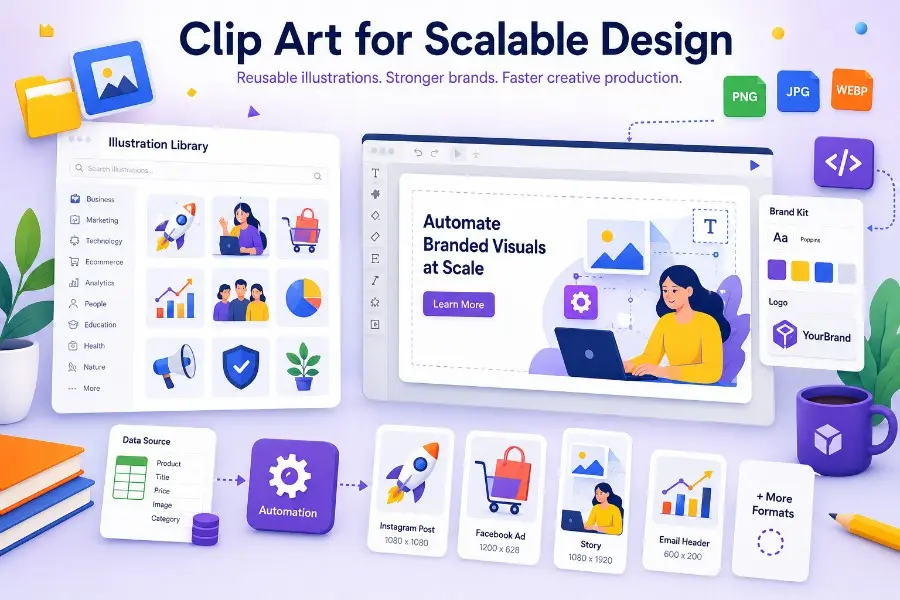
Direct answer: modern clip art is useful when it is treated as a reusable design component, not as decoration. In creative automation workflows, clip art can help teams produce branded visuals faster, keep campaigns consistent, and reduce repetitive design work across ads, social media, ecommerce, email, and landing pages.
For years, “clip art” sounded like a relic of early office software.
Generic icons. Random illustrations. Low-resolution graphics. Visual shortcuts that made a brand look cheap instead of clear.
That version of clip art is not what modern marketing teams need.
Today, the useful version is different: consistent illustration libraries, editable vector-style assets, product icons, campaign visuals, empty-state graphics, onboarding illustrations, and reusable design components that can be inserted into templates, customized with brand colors, and generated at scale.
That is why clip art is quietly becoming relevant again.
Not because marketers need more decoration.
Because modern teams need more scalable visual systems.
In a world where campaigns are localized, personalized, resized, tested, and refreshed constantly, reusable illustrations can become part of a serious creative automation stack.
What is clip art in 2026?
Clip art is a reusable visual element that can be inserted into a design without being created from scratch each time.
Modern clip art can include:
- flat illustrations;
- vector-style characters;
- icons;
- product scenes;
- decorative shapes;
- UI illustrations;
- onboarding graphics;
- industry-themed visuals;
- social media illustrations;
- ecommerce and promotional graphics.
A good library of clip art is not just a folder of images. It is a reusable visual vocabulary that helps teams communicate ideas faster.
The difference between old clip art and modern clip art is consistency.
Old clip art was random.
Modern clip art is structured, searchable, editable, brand-aware, and useful inside repeatable design workflows.
Why clip art matters again
The demand for visual content has changed.
A marketing team no longer creates one campaign image and publishes it everywhere.
The same campaign may need:
- a LinkedIn post;
- an Instagram story;
- a display ad;
- a newsletter header;
- a landing page hero;
- a product launch banner;
- a marketplace image;
- a localized version for each region;
- a personalized version for each audience segment.
This creates a production problem.
The team needs many visual variations, but it cannot afford to design each one manually from zero.
That is where clip art becomes useful again.
Reusable illustrations give teams a starting point. Templates give structure. Automation gives scale.
Together, they turn visual production from manual design work into a repeatable workflow.
Clip art vs illustration libraries vs creative automation
These terms are related, but they do not mean the same thing.
| Term | Meaning | Best use |
|---|---|---|
| Clip art | Individual reusable visual elements | Fast visual composition and simple communication |
| Illustration library | A consistent collection of illustrations in the same style | Brand consistency across many assets |
| Design template | A predefined layout with editable elements | Repeatable campaign and content creation |
| Creative automation | A workflow that generates many branded assets from templates, data, or APIs | Large-scale visual production |
| Image generation API | A programmatic way to generate visuals automatically | SaaS platforms, ecommerce, marketplaces, and internal tools |
The strongest workflow combines all five.
For example:
- Choose an illustration style.
- Place clip art inside a branded template.
- Connect the template to product, campaign, or customer data.
- Generate multiple formats automatically.
- Review, export, or publish the finished assets.
This is where Pixelixe fits naturally.
Pixelixe helps teams move from individual design creation to structured image automation.
Useful internal resources include:
- Creative Automation for scaling branded visual production.
- Image Generation API for generating images from templates.
- White-label Image Editor for embedding design capabilities into a SaaS product.
The strategic role of clip art in visual automation
Clip art is most valuable when it plays a clear role in the production system.
It can help with:
- communicating abstract ideas quickly;
- making empty states and onboarding screens more engaging;
- supporting campaign visuals without a full photoshoot;
- adding visual structure to educational content;
- creating lightweight brand moments inside product experiences;
- producing fast variants for social media and ads;
- reducing dependency on custom illustration work for every asset.
But clip art should not be used randomly.
A scalable workflow needs rules.
The question is not:
Which illustration looks nice?
The better question is:
Which visual component can be reused across formats, campaigns, and audiences without weakening brand consistency?
That is the difference between decoration and design infrastructure.
Where clip art works best
Clip art works especially well in workflows where clarity matters more than photorealism.
| Use case | Why clip art helps |
|---|---|
| SaaS onboarding | Explains product concepts without needing screenshots everywhere |
| Blog headers | Creates consistent editorial visuals across content clusters |
| Social media posts | Speeds up production of branded educational content |
| Email campaigns | Adds visual hierarchy without heavy design work |
| Ecommerce promotions | Supports sale, shipping, seasonal, and category messages |
| Product launch banners | Communicates features quickly |
| Help center content | Makes instructional content easier to scan |
| Empty states | Gives product interfaces a more polished feel |
| Lead magnets | Improves visual appeal of guides, checklists, and templates |
| Localized campaigns | Makes it easier to adapt visuals across languages and regions |
For teams producing visual content every week, these small gains compound.
A reusable illustration style can save hours across each campaign cycle.
Where clip art fails
Clip art fails when it is treated as a patch for weak design.
It can make visuals worse if:
- the illustration style changes from asset to asset;
- the colors do not match the brand system;
- the asset is too generic;
- the visual does not support the message;
- the image feels childish for a serious brand;
- the same illustration appears in too many unrelated places;
- the asset is inserted manually without layout rules;
- the final export is not adapted to the channel.
The problem is rarely clip art itself.
The problem is ungoverned usage.
That is why the best teams treat illustration assets like any other brand component.
They define where they can be used, how they should be modified, and how they fit into templates.
How to use clip art inside a brand system
A scalable clip art workflow should include clear rules.
1. Choose one visual style
Do not mix five illustration styles in the same brand environment.
Pick a style that matches the brand personality:
- minimal;
- playful;
- technical;
- editorial;
- corporate;
- geometric;
- hand-drawn;
- 3D-inspired;
- flat vector;
- line-based.
Consistency matters more than originality for most production workflows.
2. Map illustrations to content categories
A useful library should be organized by meaning, not only by filename.
Example categories:
- onboarding;
- productivity;
- ecommerce;
- automation;
- analytics;
- social media;
- email marketing;
- collaboration;
- AI workflows;
- security;
- payments;
- customer support;
- product updates.
This makes the library easier to use for marketers, designers, and product teams.
3. Define brand color rules
Clip art should not fight the rest of the visual identity.
Define:
- primary color mapping;
- secondary accent colors;
- neutral colors;
- forbidden combinations;
- light and dark background compatibility;
- accessibility contrast requirements.
If illustrations are editable, recolor them before inserting them into templates.
4. Use templates instead of manual placement
Manual placement does not scale.
Templates create consistency.
A blog header template, for example, can include:
- illustration area;
- title area;
- author or category label;
- background pattern;
- logo safe zone;
- export sizes.
Once the structure exists, clip art becomes a variable.
That is where image automation becomes powerful.
5. Connect templates to data
The biggest productivity gain appears when templates are connected to structured data.
Examples:
- blog title;
- campaign name;
- product category;
- discount percentage;
- region;
- language;
- date;
- CTA;
- customer segment;
- product image;
- illustration ID.
With Pixelixe, teams can generate visuals from structured inputs using APIs and templates instead of rebuilding every graphic manually.
Example workflow: from clip art to automated campaign visuals
Here is a practical workflow for a marketing team launching a new feature.
Step 1: Define the campaign message
Example:
“Automate branded product images from your ecommerce catalog.”
Step 2: Select the visual metaphor
Possible illustration concepts:
- automation workflow;
- product catalog;
- image generation;
- templates;
- ecommerce storefront;
- API connection.
Step 3: Choose matching clip art
The team selects one illustration style and one relevant visual asset.
Step 4: Insert it into a Pixelixe template
The template defines:
- layout;
- typography;
- colors;
- CTA;
- logo position;
- safe zones;
- export formats.
Step 5: Generate variants
The campaign can then be generated in multiple formats:
- 1200 × 628 Open Graph image;
- 1080 × 1080 social post;
- 1080 × 1920 story;
- 1200 × 1200 ad creative;
- 600 × 300 email header;
- localized versions for different markets.
Step 6: Review and publish
The team reviews the generated assets, adjusts if needed, and publishes the final visuals.
This is the difference between using clip art as a shortcut and using clip art as a scalable design component.
Why this matters for AI Search and AI Overviews
Search behavior is becoming more conversational, visual, and task-oriented.
Users no longer only search for “clip art download.”
They ask questions like:
- “How can I create branded illustrations for many blog posts?”
- “What is the best way to automate campaign visuals?”
- “Can clip art be used professionally in SaaS marketing?”
- “How do I keep visual assets consistent across many channels?”
- “How can I generate social media images from templates?”
This changes how content should be written.
A strong article should provide:
- direct answers;
- definitions;
- comparison tables;
- repeatable workflows;
- practical frameworks;
- clear examples;
- FAQ sections;
- related entity coverage;
- internal links to deeper resources.
For a platform like Pixelixe, the opportunity is not to rank only for “clip art.”
The opportunity is to own the broader topic:
reusable visual assets for scalable creative automation.
That topic is much closer to Pixelixe’s authority.
Clip art and AI image generation are not enemies
AI image generation is powerful, but it does not remove the need for reusable visual systems.
In many production environments, AI-generated visuals create new challenges:
- inconsistent style;
- unpredictable details;
- brand drift;
- legal review concerns;
- hard-to-repeat outputs;
- slow approval cycles;
- lack of template structure.
Clip art and illustration libraries solve a different problem.
They offer reusable, predictable components.
AI can help generate or adapt visual assets, but production teams still need:
- templates;
- brand rules;
- approval workflows;
- reusable components;
- export formats;
- version control;
- automation logic.
The future is not “clip art or AI.”
The future is structured visual production where AI, templates, APIs, and asset libraries work together.
How SaaS products can use clip art professionally
SaaS companies can use clip art in a serious way when they make it part of their product and marketing system.
Strong use cases include:
Product onboarding
Illustrations can explain concepts before users have data inside the product.
Examples:
- “Create your first campaign.”
- “Connect your ecommerce store.”
- “Invite your team.”
- “Generate your first branded image.”
Empty states
Empty states are often ignored, but they are important product moments.
Good illustration can make an empty dashboard feel guided rather than broken.
Feature announcements
A consistent illustration system can make product updates easier to recognize across blog posts, emails, changelogs, and in-app messages.
Educational content
Illustrations can simplify abstract topics such as automation, APIs, templates, data feeds, AI workflows, and campaign operations.
Automated customer-facing graphics
For SaaS platforms that generate visuals for their own users, clip art can become a selectable component inside templates.
For example, a real estate SaaS might let agents generate social media posts with consistent home, city, and finance illustrations.
A restaurant marketing tool might generate local offer graphics using food, delivery, and seasonal icons.
A recruiting platform might generate employer branding visuals using team, hiring, and workplace illustrations.
How ecommerce teams can use clip art
Ecommerce teams often rely heavily on product photos, but clip art still has a role.
It can support:
- shipping messages;
- category banners;
- sale announcements;
- loyalty campaigns;
- gift guides;
- seasonal collections;
- return policy visuals;
- marketplace education;
- product comparison graphics.
The goal is not to replace product photography.
The goal is to improve visual communication around product photography.
For example, a product image can remain central while clip art adds:
- a delivery icon;
- a discount badge;
- a seasonal element;
- a visual category marker;
- a campaign frame;
- a benefit illustration.
With a tool like Pixelixe, those elements can be placed inside reusable templates and generated automatically across hundreds or thousands of products.
How agencies can scale client visuals with clip art
Agencies face a specific challenge.
They need to produce many visuals for many clients without making every asset from scratch.
Clip art and illustration libraries can help when paired with strong brand governance.
An agency can create:
- one template system per client;
- one approved illustration style per client;
- reusable campaign layouts;
- content category rules;
- automated export presets;
- approval workflows.
Then the agency can generate more variants without reducing quality.
This is especially useful for:
- local marketing campaigns;
- franchise networks;
- multi-location businesses;
- paid social campaigns;
- seasonal promotions;
- blog and newsletter production;
- ecommerce catalog updates.
The agency keeps strategic design control.
Automation handles repetitive production.
A practical checklist before using clip art at scale
Before adding clip art to a production workflow, answer these questions.
| Question | Why it matters |
|---|---|
| Does the style match the brand? | Prevents visual inconsistency |
| Can the colors be adapted? | Makes assets fit the brand system |
| Are usage rights clear? | Reduces legal and licensing risk |
| Can assets be used across formats? | Improves production efficiency |
| Are files available in editable formats? | Allows customization |
| Does the library cover enough topics? | Prevents repetitive visuals |
| Can marketers search and reuse assets easily? | Reduces designer bottlenecks |
| Can assets be placed into templates? | Enables automation |
| Can final visuals be generated through an API? | Supports scale |
| Are there approval rules? | Protects brand quality |
This checklist prevents clip art from becoming a messy asset folder.
The best clip art is invisible infrastructure
The best clip art does not call attention to itself.
It helps the user understand the message faster.
It supports the layout.
It reinforces the brand.
It makes production easier.
It becomes part of the system.
That is why modern clip art should be evaluated less like decoration and more like infrastructure.
A reusable visual asset has value when it can be used repeatedly without creating inconsistency.
That is also the core logic behind creative automation.
Recommended architecture for scalable visual production
A scalable visual production stack can look like this:
| Layer | Role |
|---|---|
| Asset library | Stores illustrations, icons, logos, product images, and brand elements |
| Brand system | Defines colors, typography, spacing, layout, and usage rules |
| Templates | Convert brand rules into reusable layouts |
| Data source | Provides campaign, product, customer, or content variables |
| Image automation API | Generates final visuals programmatically |
| Review workflow | Checks quality before publishing |
| Export and distribution | Sends assets to CMS, email, ads, social, or ecommerce platforms |
Clip art belongs in the asset library layer.
Pixelixe supports the template, automation, and generation layers.
Together, they create a repeatable system for producing branded visuals at scale.
Final recommendation
Clip art is useful again because visual production has become harder, not easier.
Marketing teams, SaaS companies, ecommerce brands, and agencies need more visuals, in more formats, for more channels, with more personalization and less time.
A modern illustration library can help, but only when it is connected to a structured workflow.
Do not use clip art as random decoration.
Use it as a reusable design component.
Place it inside templates.
Control it with brand rules.
Connect it to automation.
Generate variants through APIs.
Review outputs before publishing.
That is how clip art becomes more than a design shortcut.
It becomes part of a scalable creative production system.
FAQ
Is clip art still useful for professional marketing?
Yes. Clip art is useful when it comes from a consistent illustration library and is used inside a brand-controlled template system. It becomes less useful when it is generic, inconsistent, or inserted manually without design rules.
What is the difference between clip art and an illustration library?
Clip art usually refers to individual reusable visual elements. An illustration library is a consistent collection of visual assets designed to work together across a brand, product, or campaign system.
Can clip art be used in creative automation?
Yes. Clip art can be used as a variable inside automated templates. A workflow can select an illustration, combine it with text and brand elements, and generate multiple image formats automatically.
How does Pixelixe help with clip art workflows?
Pixelixe helps teams turn reusable visual assets into scalable branded outputs. Teams can place illustrations into templates, connect templates to structured data, and generate images programmatically through image automation APIs.
Is AI image generation replacing clip art?
Not completely. AI image generation is useful for creating new visuals, but clip art and illustration libraries remain valuable because they are consistent, reusable, predictable, and easier to govern inside brand systems.
What makes clip art look professional?
Professional clip art is consistent in style, aligned with brand colors, used with clear purpose, placed inside well-designed templates, and adapted to the final channel.
What are the best use cases for clip art?
The best use cases include SaaS onboarding, empty states, blog headers, social media posts, ecommerce banners, product launch visuals, help center content, email campaigns, and localized marketing assets.
How should teams organize clip art assets?
Teams should organize clip art by content category, visual style, usage rights, file format, brand compatibility, and campaign use case. This makes assets easier to reuse in automated workflows.
