
Quick Answer: Creative automation helps marketing teams generate branded visuals at scale. It is useful for ads, ecommerce graphics, email headers, social posts, marketplace images, landing pages, and localized campaigns.
However, automation works best when the source images are already clean, consistent, and ready to use.
A template can control layout, typography, logo placement, brand colors, export sizes, and campaign variations. It cannot fully fix poor lighting, distracting backgrounds, inconsistent colors, rough portraits, or messy product photos.
That is why the strongest visual workflow usually looks like this:
Choose strong source images.
Edit portraits, products, and lifestyle photos first.
Clean or replace backgrounds where needed.
Correct color, lighting, tone, and visual consistency.
Export reusable image assets.
Use creative automation to generate final campaign variations.
Review the results for brand, clarity, and channel fit.
Photo editing improves the image.
Creative automation scales the campaign asset.
Used together, they help brands move from raw photos to polished marketing visuals much faster.
Why Creative Automation Still Needs Good Source Images
Creative automation is powerful because it helps teams scale one visual idea into many finished assets.
A marketing team can build one design system, then generate variations for different products, audiences, regions, offers, languages, channels, or ad sizes. Platforms such as Pixelixe make this easier by helping teams create branded graphics from reusable templates, dynamic image inputs, and API-based workflows.
That solves a real production problem.
Modern campaigns rarely need one final image. They need product cards, social media posts, display ads, ecommerce banners, email graphics, landing page visuals, retargeting assets, Open Graph images, and localized versions of the same campaign.
Still, automation does not remove the need for strong photography.
If the source image is weak, the template will carry that weakness into every output. A product photo with poor lighting will still look poor inside a banner. A portrait with distracting background marks will still feel unfinished inside a testimonial graphic. A lifestyle image with inconsistent color will still clash with the rest of the campaign.
Creative automation scales the design system.
It does not magically repair the visual foundation.
Bad Inputs Scale Bad Outputs
The biggest risk with automation is simple: bad inputs scale quickly.
When source images are polished, automation can turn them into hundreds of useful branded assets. When source images are inconsistent, automation spreads the same visual problems across every placement.
This is why photo editing should be treated as part of the creative automation pipeline, not as a separate afterthought.
There are really two layers in a scalable visual workflow:
| Layer | Purpose | Output |
|—|—|—|
| Photo preparation | Improve image quality before design | Clean, consistent image library |
| Creative automation | Generate branded variations | Banners, ads, social posts, product cards, email graphics |
The first layer protects quality.
The second layer protects speed.
Brands need both if they want visuals that are fast and professional.
What Photo Editing Should Fix Before Automation
Photo editing does not need to make every image look perfect. It needs to make each image usable across more campaign formats.
Before images enter a template system, teams should check the most common quality issues:
Is the subject clear?
Is the background helping or distracting?
Is the lighting usable?
Are colors consistent across the set?
Does the product look accurate?
Do portraits look natural and trustworthy?
Can the image be cropped into square, vertical, and horizontal layouts?
Is there enough clean space for text or design elements?
These questions matter because templates often crop and reuse images in different ways. A portrait may become a square testimonial card, a horizontal website banner, a vertical story ad, and a circular speaker avatar. A product photo may become a marketplace image, a catalog tile, an email promotion, and a paid social ad.
If the image is not prepared at the source, every format becomes harder to manage.
Portrait Retouching for Campaign Images
Portraits are used everywhere in marketing.
They appear in founder stories, team pages, customer testimonials, recruitment campaigns, creator ads, event promotions, webinar cards, speaker announcements, coaching offers, SaaS landing pages, and personal brand content.
The challenge is that portraits need to look polished without looking fake.
Over-retouched skin can reduce trust. Harsh contrast can make faces look tired. Uneven lighting can distract from the message. Small details such as shine, blemishes, under-eye shadows, flyaway hair, or background marks can make a good image feel less professional.
This is where AI-assisted portrait editing can help.
For brands and agencies, the goal is not beauty retouching for its own sake. The goal is to make people look natural, consistent, and campaign-ready.
Skin should keep texture. Facial features should remain recognizable. The person should still look human.
Tools like Evoto’s portrait retouching can help speed up common portrait cleanup tasks before images move into templates. This is especially useful when a team needs to prepare many headshots, customer portraits, creator photos, or speaker images with the same visual standard.
The key is restraint.
Automation can help with repetitive cleanup, but human review still needs to protect taste and identity.
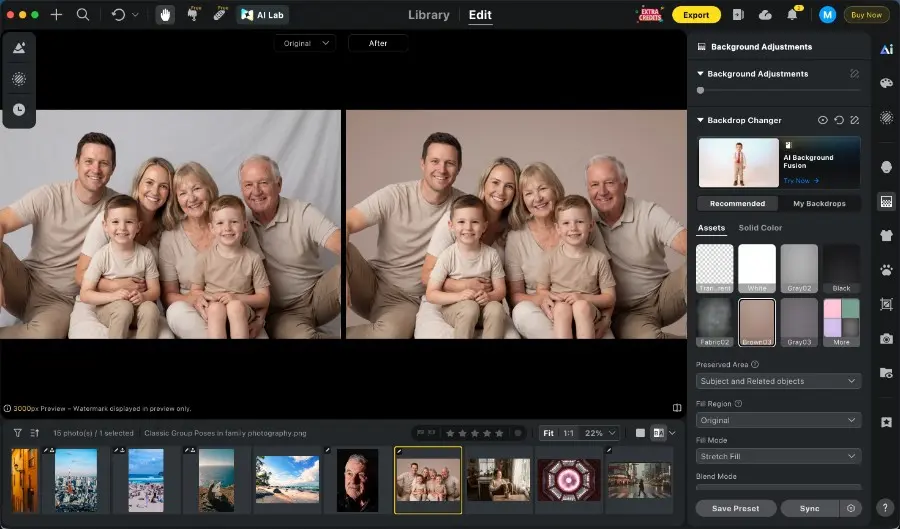
Background Replacement Gives Templates More Room To Work
Backgrounds play a bigger role in creative automation than many teams realize.
A busy or inconsistent background can limit how an image works inside a template. It can make text harder to read. It can reduce contrast. It can make a product or person feel less important. It can also make a campaign look inconsistent when several images appear together.
This is why background editing should happen before design automation begins.
For some images, the best solution is cleaning small distractions. For others, it is replacing the original background with a more useful one. A clean studio background, a consistent brand-colored backdrop, or a simple neutral setting can make the same image much easier to reuse across ads, ecommerce graphics, email headers, and social posts.
Evoto’s background replacer helps teams replace or refine simple portrait and product backgrounds so the final image fits a campaign system better.
This matters for creative automation because templates need predictable image behavior.
A clean or replaced background gives designers more control. It creates space for headlines, prices, badges, calls to action, logos, and layout variations. It also helps the same product or portrait fit across multiple formats without needing a new manual edit every time.
For example, a product image can be placed on a clean dark background for a premium campaign, a light neutral background for ecommerce, or a seasonal brand color for a sale graphic. A portrait can be moved from an uneven studio backdrop to a cleaner background that works better in a speaker card, testimonial layout, or recruitment campaign.
The image becomes easier to design with.
The template becomes easier to scale.
Color Consistency Across Campaign Assets
Color consistency is another major reason to edit images before automation.
Photos are often captured in different lighting conditions. One image may come from a studio. Another may come from window light. Another may come from an outdoor shoot, event space, creator submission, retail location, or customer environment.
When those images appear together in one campaign, the differences can feel messy.
One image may be too warm. Another may be too cool. One product may look slightly different from shot to shot. Skin tones may shift across a series of portraits. Lifestyle images may not feel like they belong to the same brand.
Creative automation can generate the final assets, but it cannot always make a mixed photo library feel intentional.
AI-assisted color editing can help bring image sets closer together before they enter templates. The goal is not to make every image identical. The goal is to create a coherent visual direction.
Once the image library has consistent lighting, tone, and color, template-based production becomes more reliable.
Designers spend less time correcting mismatched assets.
Marketers get cleaner campaign outputs.
The brand feels more consistent across every channel.
Batch Editing for High-Volume Production
Marketing teams usually work in sets.
A product launch may include many SKUs. A beauty brand may need dozens of model images. An event team may need speaker portraits, attendee photos, venue images, and recap visuals. An agency may need to prepare client visuals across many formats and deadlines.
Editing one image at a time slows everything down.
Batch editing helps teams apply consistent adjustments across related images. Evoto offers batch edits that can support this kind of workflow by reducing repetitive manual edits before images are handed off to a design or automation platform.
A practical workflow may look like this:
Select the strongest source images.
Apply base corrections for exposure, tone, and color.
Retouch portraits or product details where needed.
Clean or replace backgrounds.
Sync consistent edits across similar images.
Export polished assets for template-based production.
Use creative automation to generate campaign variations.
The benefit is not only speed.
It is consistency.
When images are prepared in the same way, every downstream creative asset looks more professional.
How Photo Editing and Pixelixe-Style Automation Work Together
AI photo editing and creative automation solve different parts of the same production problem.
Photo editing prepares the image.
Template automation turns that image into scalable campaign creative.
Together, they create a stronger workflow for brands, agencies, ecommerce teams, photographers, and SaaS platforms.
For example, a marketing team can prepare clean product photos, then use a template-based platform to generate promotional banners in multiple sizes. A creative agency can polish client portraits, then create social graphics, email headers, and ad variations. An ecommerce team can standardize product images, then generate localized sale graphics for different markets.
This is where Pixelixe fits naturally.
Pixelixe’s Image Generation API and JSON-to-image API are most useful when the image inputs are already clean, structured, and campaign-ready.
If an image URL points to a poorly lit product photo, the generated banner will inherit that problem. If customer portraits are inconsistent, testimonial graphics will feel inconsistent. If backgrounds vary too much, the same template may produce uneven results.
So the real question is not only:
Can we generate this image automatically?
It is also:
Are the source assets strong enough to be generated automatically at scale?
The better the image library, the stronger the automated output.
Ecommerce Is Where This Workflow Becomes Obvious
Ecommerce teams show why photo preparation matters so much.
A single product image may appear on a product page, collection page, marketplace listing, paid ad, seasonal banner, email campaign, recommendation widget, social post, and retargeting graphic.
If the product photo is inconsistent, every generated asset becomes less trustworthy.
This affects perceived product value, ad performance, click-through rate, marketplace trust, conversion rate, return expectations, and brand consistency.
Before ecommerce images enter a creative automation workflow, teams should standardize background style, product cropping, lighting, shadow treatment, color accuracy, aspect ratio, naming conventions, and export format.
Once the product image base is clean, automation can do its job much better.
The same prepared product image can become a social post, discount banner, email header, category visual, marketplace graphic, retargeting ad, or localized campaign asset.
The product stays consistent.
The campaign scales faster.
Agencies and Photographers Can Deliver More Value
Commercial photographers and agencies are no longer only delivering image files.
Many clients need campaign-ready visual systems.
A photographer may deliver portraits, but the client also needs LinkedIn graphics, speaker cards, website banners, testimonial visuals, and email assets. An agency may receive product photos, but the client needs ads, social posts, landing page graphics, marketplace visuals, and seasonal campaign templates.
This creates an opportunity.
Instead of delivering edited images as isolated files, agencies can package them as part of a larger creative workflow:
Prepare image sets through AI-assisted editing.
Retouch portraits, products, and lifestyle images.
Replace or refine backgrounds for better design use.
Organize assets by campaign purpose.
Build reusable templates.
Generate channel-specific variations.
Deliver ready-to-publish campaign assets.
This connects photography, editing, design, and marketing execution.
It also makes the final delivery more valuable.
Human Review Still Matters
AI tools can speed up production, but human review still matters.
A tool can retouch a portrait, but a person needs to decide whether the subject still looks natural. A tool can replace a background, but a designer needs to decide whether the new background fits the campaign. A tool can match color, but a creative lead needs to check whether the mood fits the brand. A template can generate many variations, but a marketer still needs to review clarity, message, offer, and channel fit.
The strongest workflow is not fully manual or fully automated.
It is assisted.
AI handles repetitive editing tasks.
Designers and marketers make final creative decisions.
Automation platforms scale the approved system.
That balance helps teams move faster without losing quality.
Practical Checklist Before Automating Marketing Visuals
Before sending images into a creative automation workflow, review the source library carefully.
Ask these questions:
Is the main subject clear?
Is the background clean or replaceable?
Does the background support text and layout?
Is the image sharp enough?
Is the lighting consistent?
Are colors aligned with the campaign mood?
Does the product look accurate?
Do portraits look natural and recognizable?
Can the image be cropped into multiple formats?
Are similar images edited consistently?
Are file names and image URLs ready for automation?
Are exports ready for templates and API workflows?
If several answers are no, the image library should be improved before automation begins.
This step saves time later.
It also protects brand quality.
Final Thoughts
Marketing teams do not only need more visuals.
They need better visual systems.
Creative automation helps brands generate more campaign assets, but it works best when the source images are already clean, consistent, and flexible.
That is why photo editing should come first.
Retouch the portraits. Clean or replace the backgrounds. Match the colors. Prepare the product images. Build a reliable image library.
Then use template-based automation to scale the campaign.
Photo editing improves the visual input.
Creative automation scales the branded output.
Together, they help teams create better marketing visuals faster.
