
Why Image Upscaling Belongs Inside a Creative Automation Workflow
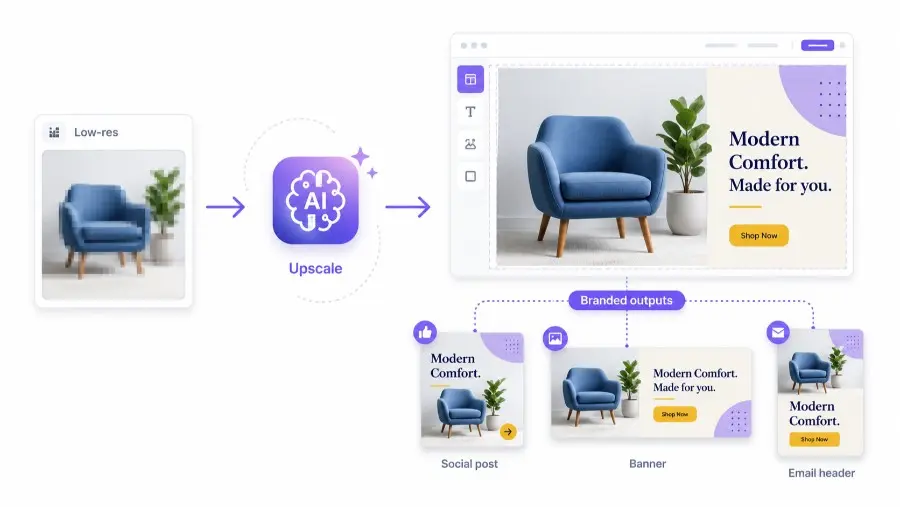
Direct answer: image upscaling improves image resolution, but its real business value appears when it is connected to a creative automation workflow. A higher-resolution image becomes more useful when it can be placed into branded templates, resized for many channels, combined with campaign data, reviewed for quality, and exported at scale.
Inspect an upscaled image for invented product detail
Upscaling can add pixels and apparent sharpness without recovering information that was absent from the source. Define which details must remain faithful before deciding that an enlarged file is suitable for a campaign.
For an illustrative product photograph, inspect fine labels, seams, texture, reflections and edges. Compare the actual exported file with the source at the required display size. Reject a result that turns uncertain detail into a false product characteristic.
Keep the original, selected output and operation settings together. If several images need the same treatment, include difficult samples in the trial. A successful enlargement of one subject does not establish the same quality across a catalogue.
Use the 3D-versus-photo evidence distinction, the approved-source record and the product-visualization review to decide whether the increased dimensions support the actual use.
Practical guidance revised November 2, 2026. Examples are illustrative.
AI image upscaling is often treated as a simple before-and-after feature.
Upload a small image. Get a sharper image. Use it somewhere else.
That is useful, but it is not the whole production problem.
Marketing teams, ecommerce brands, SaaS platforms, marketplaces, agencies, and content teams rarely need one improved image in isolation. They need many usable visuals across many formats: product banners, social posts, ads, landing page images, email headers, marketplace graphics, Open Graph images, and localized campaign assets.
That is why image upscaling should not be seen only as photo enhancement.
It should be seen as one step inside a larger visual production system. That is why image upscaling should not be seen only as photo enhancement. Tools like an image enhancer improve one image at a time, but the real production value comes from what happens after, connecting that improved image to templates, data, and scaled output. It should be seen as one step inside a larger visual production system.
The question is not only:
Can we make this image larger?
The better question is:
Can we turn imperfect source images into consistent, brand-ready assets at scale?
That is where image upscaling meets creative automation.
What is image upscaling?
Image upscaling is the process of increasing an image’s resolution while preserving or improving visual quality.
Traditional upscaling stretches pixels. AI image upscaling uses models to infer missing detail, sharpen edges, reduce blur, and make low-resolution images more usable in larger formats.
Image upscaling is useful when teams need to improve:
- product photos;
- marketplace images;
- social media graphics;
- old campaign assets;
- user-generated content;
- blog visuals;
- website images;
- presentation graphics;
- print-like exports;
- ecommerce catalog images.
A tool such as a free AI image upscaler for desktop can help improve source image quality before those images are reused in templates, campaigns, and automated production workflows.
But upscaling alone does not create a finished marketing asset.
It prepares the image for the next step.
Why image quality matters more in automated production
Manual design workflows often hide image quality problems because a designer can make local adjustments.
They can crop, retouch, resize, replace, blur, mask, or redesign around a weak source image.
Automated workflows are different.
When a system generates hundreds or thousands of visuals from templates, source image quality becomes more important. A low-resolution image can break the final output in predictable ways:
- product images look blurry inside ads;
- social previews appear unprofessional;
- marketplace listings lose trust;
- email headers look compressed;
- campaign banners fail on large screens;
- logos become pixelated;
- localized variants inherit the same weak visual;
- automated exports amplify the original defect.
In creative automation, one poor input can create many poor outputs.
That is why image upscaling should be part of the production pipeline, not an afterthought.
Upscaling is not the final asset
A common mistake is to treat an upscaled image as finished.
It usually is not.
A higher-resolution image still needs to become part of a visual communication system.
For example, an ecommerce product photo may need to be:
- upscaled;
- cleaned or cropped;
- placed into a branded product template;
- combined with price, discount, product name, and CTA;
- resized for multiple ad and social formats;
- reviewed for quality;
- exported or published.
That workflow is much closer to real production.
Pixelixe is built for the part that comes after source image preparation: branded template creation, automated rendering, API-driven image generation, and repeatable creative production.
Useful Pixelixe resources include:
- Creative Automation for scaling branded visual production from reusable templates.
- Image Generation API for rendering branded visuals from templates and structured data.
- Image Automation API for generating images from templates, spreadsheets, feeds, and API workflows.
- Creative Automation API Platform for developers building branded visual workflows.
- Product Image Automation API for catalog-driven ecommerce creatives.
- JSON to Image API for structured visual generation from backend payloads.
- Graphic Design Tool for Reusable Templates for creating automation-ready layouts.
- Automated Image Generation for recurring visual workflows.
- AI Marketing Creatives for AI-assisted creative direction and scalable variants.
- Next.js Open Graph Image API for dynamic og:image generation.
The key idea is simple:
Upscaling improves the source. Creative automation turns the improved source into reusable, branded output.
Image upscaling vs image automation
Image upscaling and image automation solve different problems.
| Capability | Main purpose | Best for | Limitation |
|---|---|---|---|
| Image upscaling | Increase resolution and improve source image quality | Low-resolution photos, product images, old assets, user-generated content | Does not create a full branded asset by itself |
| Image editing | Modify or clean an image | Background removal, cropping, retouching, filters, corrections | Still needs layout and brand context |
| Image generation | Create final visuals from templates or prompts | Campaign images, banners, social posts, product visuals | Requires brand rules and quality control |
| Creative automation | Produce many branded visual variants from templates, data, or APIs | Ecommerce, ads, email, social, programmatic SEO, SaaS workflows | Requires initial template and workflow setup |
The strongest workflow uses these capabilities together.
An image can be upscaled first, edited if needed, placed into a template, and then generated in multiple formats through automation.
When AI upscaling is especially useful
AI upscaling is valuable when the original visual asset is useful but not production-ready.
Common cases include:
1. Ecommerce product images
Ecommerce teams often receive product photos from suppliers, sellers, distributors, or internal teams.
The quality may vary.
Some images are sharp. Others are compressed, small, or inconsistent.
Upscaling can help prepare those images before they are used in:
- product promotion banners;
- category visuals;
- marketplace listings;
- price-drop campaigns;
- collection images;
- social ads;
- email merchandising blocks.
When combined with Pixelixe product image automation, those improved source images can become repeatable catalog-driven creatives.
2. Marketplace seller content
Marketplaces depend on seller-generated visuals.
That creates quality variation.
A seller may upload a low-resolution image that looks acceptable on a listing page but fails when reused in a promoted placement or social preview.
Upscaling can help improve the source image before it is inserted into standardized marketplace templates.
3. Programmatic SEO pages
Programmatic SEO pages often need dynamic images for many URLs.
Examples:
- city pages;
- category pages;
- product comparison pages;
- template galleries;
- industry pages;
- use case pages;
- integration pages.
A weak image can reduce perceived quality across many generated pages.
Upscaling can improve source visuals, while dynamic image generation can turn them into consistent Open Graph images and page graphics.
4. Social media repurposing
Social teams often reuse existing visuals across channels.
A small website image may need to become a LinkedIn post, Instagram square, story, or ad creative.
Upscaling can help recover enough quality for reuse, while templates ensure the final asset still follows brand rules.
5. Legacy brand assets
Many companies have older visuals that still have value.
They may include:
- old campaign photos;
- founder images;
- event photos;
- product screenshots;
- press images;
- customer story images;
- early product visuals.
Upscaling can help make these assets usable again, especially when they are placed into modern branded layouts.
Where image upscaling fails
AI upscaling is useful, but it is not magic.
It can fail when:
- the original image is too damaged;
- important details are missing;
- text is too small or distorted;
- faces become unnatural;
- product texture is invented incorrectly;
- brand logos are altered;
- artifacts become sharper instead of cleaner;
- the image is upscaled but still poorly composed;
- the final format needs a different crop or layout.
This is why upscaled images should be reviewed before being used at scale.
In automated production, bad inputs can create bad outputs quickly.
A production workflow should include quality gates.
Quality checks after upscaling
Before inserting an upscaled image into templates or automated workflows, check the following:
| Quality check | Why it matters |
|---|---|
| Sharpness | Ensures the image is not still visibly blurry |
| Artifact detection | Prevents compression noise from being amplified |
| Text integrity | Ensures labels, packaging, or UI text remain readable |
| Logo accuracy | Prevents brand marks from being distorted |
| Face and skin realism | Avoids unnatural results in portraits |
| Product detail accuracy | Prevents AI from inventing incorrect features |
| Background cleanliness | Helps with template placement and cropping |
| Aspect ratio fit | Ensures the image works in required formats |
| File size | Prevents overly heavy assets from slowing workflows |
| Brand compatibility | Ensures the image fits the campaign style |
The goal is not only to create a larger image.
The goal is to create a usable image.
Recommended workflow: from low-resolution image to campaign assets
Here is a practical production workflow.
Step 1: Collect source images
Start with your product photos, campaign visuals, screenshots, user-generated content, or older assets.
Step 2: Upscale weak images
Use an AI upscaler to improve source resolution before downstream production.
Step 3: Review source quality
Check for distortion, artifacts, logo issues, and visual inconsistencies.
Step 4: Prepare the image for templates
Crop, clean, or edit the image if needed.
Step 5: Insert the image into Pixelixe templates
Use approved templates with brand-safe layout rules, typography, colors, and CTA placement.
Step 6: Connect the template to data
Use product data, campaign fields, CMS data, CRM segments, or API payloads.
Step 7: Generate variants
Create multiple versions for ads, social media, email, ecommerce, landing pages, and Open Graph previews.
Step 8: Validate and publish
Review final outputs and export them to the right channels.
This workflow prevents upscaling from becoming an isolated task.
It turns upscaling into a quality improvement step inside a larger visual automation system.
Example: ecommerce product campaign
Imagine an ecommerce team preparing a summer campaign.
The team has 500 product images from different suppliers.
Some are high quality. Some are small. Some are compressed.
A manual workflow would require designers to inspect, resize, and adapt each image.
A scalable workflow looks different:
- Identify low-resolution product images.
- Upscale the weak images.
- Remove unusable or distorted outputs.
- Use Pixelixe templates for summer campaign layouts.
- Connect product feed data: name, price, discount, category, and image URL.
- Generate campaign visuals automatically.
- Export formats for paid ads, email, social media, and category pages.
- Review only exceptions or priority assets.
This approach improves both quality and speed.
The team does not upscale images for the sake of upscaling.
It upscales them so they can enter a repeatable creative production pipeline.
Example: SaaS feature launch
A SaaS company may need to launch a new product feature.
The team has a screenshot that looks fine in a help center article but too small for a landing page hero or LinkedIn campaign.
The workflow could be:
- Upscale the screenshot.
- Verify that UI text and icons remain readable.
- Place the screenshot into a branded feature announcement template.
- Add headline, benefit, CTA, and product logo.
- Generate sizes for blog, social, email, and Open Graph.
- Publish the campaign.
This creates a more consistent launch experience.
The customer sees the same feature story across multiple touchpoints.
Example: agency production
Agencies often receive imperfect assets from clients.
A client may send small logos, old product photos, compressed event images, or low-quality campaign visuals.
Instead of rejecting every weak file or rebuilding everything manually, the agency can create a structured workflow:
- Upscale usable assets.
- Reject assets that fail quality checks.
- Place approved assets into client-specific templates.
- Generate campaign variants for each channel.
- Keep the final outputs inside the approved brand system.
This helps agencies scale production without lowering quality.
Why desktop upscaling can fit professional workflows
Cloud APIs are useful for automated pipelines, but desktop tools also have a place.
A desktop upscaler can be useful when:
- a marketer needs to prepare a small batch of images;
- a designer wants to inspect output manually;
- the team wants local control before upload;
- assets need to be improved before entering a template workflow;
- users want a quick preprocessing step without writing code.
The important point is not whether upscaling happens on desktop or through an API.
The important point is whether the improved image enters a reliable production workflow afterward.
How to decide if an image should be upscaled
Not every image deserves upscaling.
Use this decision framework.
| Question | Upscale if… | Do not upscale if… |
|---|---|---|
| Is the image strategically useful? | It supports a campaign, product, page, or customer workflow | It is outdated or irrelevant |
| Is the source quality recoverable? | It is slightly blurry or too small | It is heavily damaged or missing key detail |
| Does the image contain text or logos? | They remain accurate after upscaling | They become distorted or invented |
| Will the image be reused at scale? | It appears in many templates or formats | It is a one-off asset with low impact |
| Does it fit the brand? | It can be placed into approved layouts | It conflicts with brand direction |
| Is there a better source available? | No better file exists | A higher-quality original can be retrieved |
The best teams do not upscale everything.
They upscale images that have production value.
Why image upscaling supports brand trust
Customers may not consciously notice image resolution.
But they notice poor quality.
Blurry product photos, pixelated logos, compressed campaign visuals, and inconsistent assets can make a brand feel less professional.
This matters especially for:
- ecommerce brands;
- SaaS landing pages;
- marketplaces;
- paid advertising;
- luxury products;
- B2B sales materials;
- investor or press content;
- onboarding experiences.
High-quality visuals support trust.
Consistent high-quality visuals support recognition.
Automated high-quality visuals support scale.
That combination is where image upscaling and creative automation work together.
AI Search angle: why this topic matters now
Search behavior is becoming more conversational and task-oriented.
Users no longer only search for “image upscaler.”
They ask questions like:
- “How do I improve low-resolution product images for ecommerce?”
- “How can I automate branded visuals from product photos?”
- “Should I upscale images before generating ad creatives?”
- “What is the best workflow for image quality in creative automation?”
- “How do I generate Open Graph images from existing visuals?”
- “How do I scale campaign assets without losing quality?”
To answer those questions, content must connect image upscaling to the broader production workflow.
That is why this topic belongs on Pixelixe.
Pixelixe is not only about making an image look better.
It is about helping teams generate consistent branded visuals from templates, data, and APIs.
The production stack for better visual assets
A scalable visual production stack can include:
| Layer | Role |
|---|---|
| Source image library | Stores product photos, screenshots, logos, illustrations, and campaign images |
| Upscaling and preprocessing | Improves weak images before production |
| Editing layer | Crops, removes backgrounds, adjusts composition, or applies filters |
| Brand system | Defines colors, typography, logos, spacing, and visual hierarchy |
| Templates | Turn brand rules into reusable layouts |
| Data source | Provides product, campaign, customer, or content variables |
| Image automation API | Generates final assets programmatically |
| Review workflow | Checks quality before publishing |
| Export and distribution | Sends assets to social, ads, email, CMS, ecommerce, or internal tools |
Image upscaling belongs near the start of this workflow.
Pixelixe supports the template, automation, rendering, and export layers.
Best practices for combining upscaling and creative automation
1. Upscale before template generation
Improve source images before inserting them into automated templates.
This prevents one low-quality input from creating many weak outputs.
2. Keep original files
Always keep the original image.
AI upscaling can introduce artifacts, so the original may be needed for comparison or reprocessing.
3. Review sensitive details
Pay close attention to faces, logos, product labels, UI text, and texture.
These are areas where AI upscaling can introduce mistakes.
4. Standardize naming and metadata
Use clear filenames and metadata so improved images can be reused correctly in automation workflows.
5. Connect images to templates
Do not leave upscaled images in a folder.
Connect them to templates, feeds, or API workflows so they can become final branded assets.
6. Automate only after quality rules are clear
Before scaling the workflow, define what counts as acceptable quality.
Automation should accelerate good rules, not multiply weak ones.
Final recommendation
AI image upscaling is valuable, but it should not be treated as the whole workflow.
It is a preparation step.
The real business value appears when improved images can be reused in consistent, branded, automated production.
For ecommerce teams, that means better product campaign visuals.
For SaaS teams, that means clearer launches, better Open Graph images, and more polished product communication.
For agencies, that means faster client asset production without sacrificing quality.
For marketplaces, that means better seller visuals and more consistent listing experiences.
The best workflow is simple:
upscale weak source images, validate quality, place them into approved templates, connect templates to data, generate variants, and publish only what meets brand standards.
That is how image upscaling becomes more than enhancement.
It becomes part of creative automation.
FAQ
What is AI image upscaling?
AI image upscaling is the process of increasing image resolution with machine learning models that infer missing detail, sharpen edges, and make low-resolution images more usable in larger formats.
Should images be upscaled before creative automation?
Yes, weak source images should usually be upscaled before they enter automated template workflows. This prevents low-resolution images from creating blurry or unprofessional outputs across many formats.
Is image upscaling the same as image automation?
No. Image upscaling improves source image quality. Image automation generates final branded visuals from templates, structured data, spreadsheets, feeds, or APIs.
How does Pixelixe help after image upscaling?
Pixelixe helps teams place improved images into branded templates, connect those templates to structured data, and generate visual variants automatically for ads, ecommerce, email, social media, landing pages, and Open Graph images.
What images benefit most from upscaling?
Product photos, marketplace images, old campaign assets, user-generated content, social media visuals, blog images, and low-resolution screenshots can benefit from upscaling when the source image is still recoverable.
Can AI upscaling damage an image?
Yes. AI upscaling can introduce artifacts, distort text, alter logos, create unnatural faces, or invent product details. Upscaled images should be reviewed before being used in production.
What is the best metric for image upscaling quality?
The best metric is not only resolution. The best metric is whether the image is usable in the final production context: template placement, channel format, brand quality, file size, and customer-facing clarity.
How can ecommerce teams use image upscaling?
Ecommerce teams can upscale low-resolution product photos before generating product banners, sale graphics, category visuals, marketplace assets, email creatives, and paid ad variants through automated templates.
How can SaaS teams use image upscaling?
SaaS teams can upscale screenshots, product visuals, customer story images, and campaign graphics before turning them into launch assets, blog headers, Open Graph images, email visuals, and social media posts.
What is the safest image production workflow?
The safest workflow is to upscale weak images first, validate quality, edit or crop if needed, place images into approved templates, generate variants through automation, and review final outputs before publishing.