
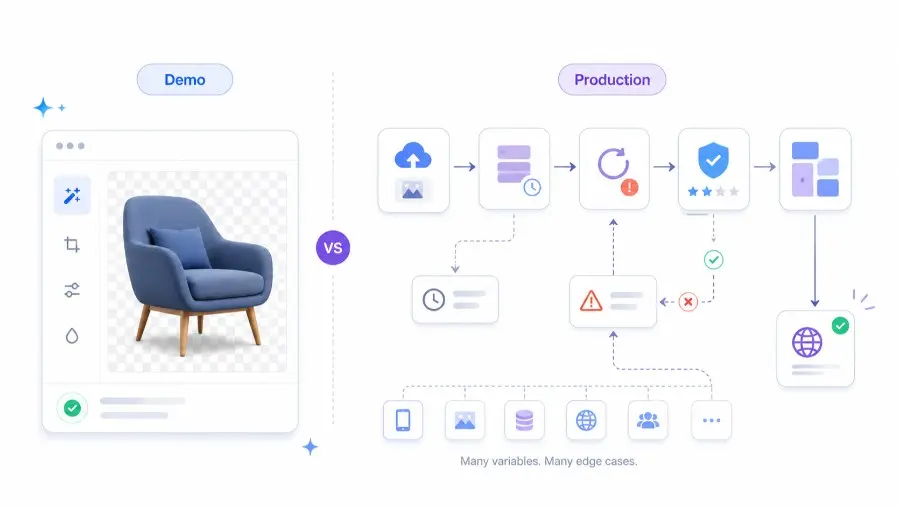
Direct answer: build image editing in-house when the transformation is your core product, your volume justifies dedicated infrastructure, and you need proprietary model control. Use an API when image editing supports your product, must ship quickly, and needs production reliability more than model ownership.
Every image editing feature looks finished at the demo.
You upload a product photo. The background disappears. The cutout looks sharp. The room nods. The feature feels done.
But the demo is usually the cheapest 20 percent of the work.
The expensive part starts when the photo is not the demo photo, the output must respect brand rules, the request volume spikes, the queue fails, a worker dies mid-job, or one bad cutout lands on a live ecommerce page.
At Pixelixe, we think about image production as a workflow, not a one-click effect. A useful image editing system is not only a model. It is an operational pipeline that can transform real inputs into brand-safe, publishable assets at scale.
That distinction matters for SaaS teams, ecommerce platforms, marketplaces, agencies, marketing tools, and AI product builders deciding whether to build image editing themselves or rely on an external API.
For example, a team may decide to call a background removal API for one specific transformation while keeping the rest of its branded visual workflow inside Pixelixe templates, rendering rules, and image automation pipelines.
The strategic question is not “Can we remove a background?”
The real question is:
Can we turn unpredictable user images into reliable, brand-safe, production-ready visuals without distracting the product team from the core business?
Image editing demo vs production: the real difference
A demo proves that an image model can work once.
A production image editing system proves that the workflow can work repeatedly, under imperfect conditions, with acceptable cost, latency, quality, and brand control.
| Area | Demo expectation | Production reality |
|---|---|---|
| Input quality | Clean test image | Blurry, compressed, low-light, cropped, inconsistent images |
| Output quality | One impressive result | Thousands of results that must be consistently acceptable |
| Infrastructure | Local script or notebook | Queues, retries, storage, monitoring, rate limits, failover |
| Cost | One GPU or trial credits | Ongoing compute, idle capacity, per-call pricing, support burden |
| Review | Human checks one image | Automated scoring, approval workflows, exception handling |
| Brand control | Not tested | Fonts, colors, layout, safe zones, formats, and publishing rules |
| Maintenance | Works today | Model updates, regressions, migrations, and vendor changes |
This is why image editing often looks “done” before it is actually production-ready.
What the demo hides
Modern segmentation, matting, inpainting, and generative editing models are good enough to create impressive prototypes quickly.
That is useful. It is also dangerous.
A weekend prototype can remove a background from a clean product photo. It does not automatically solve the cases that make production expensive:
- hair, fur, smoke, glass, reflections, transparent packaging, and low-contrast backgrounds;
- product photos with shadows that should be preserved rather than removed;
- user-uploaded files with odd aspect ratios, compression artifacts, or missing metadata;
- large batch jobs that need safe retries and predictable completion time;
- GPU infrastructure sized for peak demand but billed during quiet hours;
- model upgrades that improve one use case and quietly regress another;
- outputs that look fine at thumbnail size but fail when zoomed;
- brand requirements that the model does not understand.
In other words, the model may be good, but the model is not the whole product.
The production system is the product.
Why Pixelixe sees image editing as part of visual automation
For many teams, image editing is not the final workflow. It is one step inside a larger visual production chain.
A typical production workflow might look like this:
- A user uploads a product image.
- The background is removed.
- The image is placed inside a branded template.
- Text, price, discount, logo, CTA, and campaign rules are applied.
- Multiple sizes are generated for ads, social media, email, marketplace listings, or landing pages.
- The result is reviewed, exported, stored, or published automatically.
That is where Pixelixe’s authority matters.
Pixelixe is not only about generating a single edited image. It is built around repeatable, branded image automation: templates, structured data, rendering rules, dynamic banners, product visuals, Open Graph images, and API-driven creative production.
Relevant Pixelixe workflows include:
- Image Generation API for generating visuals from templates and structured inputs.
- Image Automation API for repeatable visual production workflows.
- JSON to Graphic API for turning structured data into branded images.
- Dynamic Banner Generation for campaign and ad creative variants.
- Product Image API for ecommerce and catalog-driven creative automation.
- Open Graph Image API for programmatic social preview images.
- White-label Image Editor for embedding image creation into a SaaS platform.
- Creative Automation for scaling branded visual production without manually designing every asset.
This is the key point:
Image editing solves the transformation. Visual automation solves the production workflow around the transformation.
What an API actually takes off your plate
A hosted image editing endpoint does not only replace a model. It often replaces the operational shell around the model.
You send an image. You receive a result. You pay per call or per volume tier.
The provider typically carries the burden of:
- model hosting;
- GPU scaling;
- retries;
- endpoint reliability;
- queue management;
- version upgrades;
- performance optimization;
- infrastructure monitoring;
- security patches;
- incident response.
That trade-off can be attractive when image editing is useful but not strategic enough to justify a dedicated machine learning and DevOps roadmap.
The trade is simple:
You give up some control in exchange for speed, operational focus, and lower maintenance burden.
For a SaaS founder or product team, that can be the difference between shipping a customer-facing workflow this week and spending a quarter building infrastructure that customers will never directly value.
The 90-percent trap in AI image editing
AI image editing often fails in a misleading way.
It does not always produce obviously bad results. It produces results that are 90 percent correct.
That is the trap.
At one image, 90 percent correct looks almost finished. Across thousands of images, 90 percent correct becomes a quality problem.
Common failures include:
- a thin halo around the subject;
- missing hair, fabric edges, or product details;
- a distorted logo;
- reversed text;
- inconsistent shadows;
- unnatural skin or object texture;
- a product cutout that looks acceptable on white but fails on a colored background;
- output that passes visual review at small size but fails in final placement.
For a production team, the question is not only “Can the model generate a good result?”
The better question is:
Can the system detect weak outputs before they are published?
That is why serious image automation workflows need quality gates.
Production image editing needs quality gates
A production-grade image editing workflow should include automated checks before the asset reaches the user or publishing channel.
Useful quality gates include:
| Quality gate | What it checks |
|---|---|
| Alpha channel validation | Whether the cutout mask is usable and complete |
| Edge confidence scoring | Whether the subject boundary is clean enough |
| Resolution checks | Whether the output is large enough for the final format |
| Brand safety checks | Whether logos, text, and visual identity remain intact |
| Aspect ratio validation | Whether the result fits required ad, social, or ecommerce formats |
| Human review fallback | Whether low-confidence outputs should be approved manually |
| Variant ranking | Whether only the best generated outputs should be shown or published |
This is especially important for marketplaces, ecommerce catalogs, real estate platforms, headshot tools, print workflows, and advertising automation.
When a bad image goes live, the failure is visible.
When a bad image goes live at scale, the failure becomes brand risk.
A concrete example: background removal
Background removal is one of the easiest image editing use cases to understand because the quality bar is visible.
A good result has:
- clean edges;
- no halo;
- preserved subject detail;
- realistic shadow handling when needed;
- transparent output that works across multiple backgrounds;
- predictable performance on real user uploads.
A bad result has:
- missing hair or object edges;
- rough masks;
- visible background residue;
- broken transparent objects;
- shadows removed when they should remain;
- results that look acceptable alone but fail inside the final creative.
If you build background removal in-house, you are not only building a model call. You are committing to a segmentation and matting pipeline, infrastructure, monitoring, model updates, QA logic, and ongoing maintenance.
If you call an API, your engineering work can shrink to:
- send the image;
- receive the edited asset;
- validate the output;
- place it into the branded Pixelixe template or downstream visual workflow;
- publish, export, or review the final creative.
That is often a better division of responsibility.
Let the specialized image editing provider handle the transformation. Let your product own the customer workflow, brand logic, and business value.
When to build image editing in-house
Build image editing yourself when at least one of these conditions is true.
1. The image transformation is your core product
If the editing model is the main reason customers buy your product, in-house control may be strategic.
Examples:
- a specialized AI photo editor;
- a headshot generation company;
- a medical or industrial image analysis workflow;
- a proprietary product visualization engine;
- a creative tool where editing quality is the main differentiator.
In these cases, the model and the pipeline are not a supporting feature. They are the business.
2. Your volume clearly beats API pricing
At high volume, per-call pricing may become more expensive than owned infrastructure.
But this calculation must include the full cost:
- GPU hosting;
- idle capacity;
- engineering time;
- DevOps time;
- model maintenance;
- monitoring;
- incident response;
- storage;
- QA;
- failed jobs;
- opportunity cost.
Many teams compare API cost against raw compute cost and forget the human cost.
That is usually the wrong comparison.
3. You need proprietary fine-tuning
If your image editing workflow depends on proprietary training data, domain-specific quality, or model behavior no generic API can provide, in-house development may be justified.
Examples:
- fashion-specific garment handling;
- luxury product retouching rules;
- regulated image workflows;
- specialized catalog photography;
- brand-specific visual corrections.
In these cases, control may matter more than speed.
4. You need full control over model behavior and roadmap
Using an API means accepting some dependency on the provider’s roadmap, pricing, latency, limits, and model changes.
If that dependency is unacceptable, building may be the right decision.
When to call an image editing API
Use an image editing API when image editing supports the product but is not the product.
This is common for:
- ecommerce platforms;
- marketing automation software;
- real estate tools;
- marketplace listing tools;
- CRM and sales enablement platforms;
- social media tools;
- print-on-demand workflows;
- ad creative generation systems;
- internal marketing operations tools.
In these cases, customers usually do not care whether you own the segmentation model.
They care that the final visual is useful, branded, fast, and ready to publish.
Use an API when:
- you need to ship quickly;
- your team is small;
- your traffic is unpredictable;
- you do not want GPU operations;
- you need predictable maintenance;
- you want to test real inputs before committing;
- your engineers should focus on product differentiation;
- the edited image will be placed into a larger creative automation workflow.
The best architecture is often hybrid
The decision is not always “build everything” or “outsource everything.”
A strong architecture can be hybrid:
| Layer | Best owner |
|---|---|
| User upload and product workflow | Your product |
| Brand templates and creative rules | Pixelixe or your internal creative system |
| Specialized transformation such as background removal | API provider or internal model |
| Output validation | Your workflow plus automated checks |
| Final layout rendering | Pixelixe image automation |
| Publishing and storage | Your application or DAM/CMS stack |
This keeps the product logic close to your business while avoiding unnecessary infrastructure ownership.
For example:
- call an API to remove the background;
- use Pixelixe to place the result into a brand-approved template;
- generate multiple campaign formats from structured data;
- review low-confidence outputs;
- publish only validated assets.
This is usually more practical than trying to make one model do everything.
A practical decision framework
Use this framework before committing to build or buy.
| Question | Build in-house if… | Use an API if… |
|---|---|---|
| Is image editing the core product? | Yes | No |
| Do you need proprietary model behavior? | Yes | No |
| Is your volume already high and predictable? | Yes | Not yet |
| Do you have ML and DevOps capacity? | Yes | No |
| Do you need the feature this week? | No | Yes |
| Is brand-safe visual production the real goal? | Not necessarily | Yes |
| Do you need templates, formats, and campaign variants? | You already have them | Use Pixelixe-style automation |
| Can you maintain quality gates? | Yes | Use provider plus validation |
The simplest rule:
Build the part that makes your product unique. Use APIs for the parts that customers expect to work but do not reward you for owning.
How to test an image editing API before adopting it
Do not test on perfect demo images.
Test on your real production edge cases.
Create a test set with:
- low-resolution images;
- compressed mobile uploads;
- hair, fur, glass, and transparent objects;
- white products on white backgrounds;
- dark products on dark backgrounds;
- reflective packaging;
- shadows that should remain;
- images with text and logos;
- marketplace or ecommerce photos from actual users;
- the final output sizes you really need.
Then evaluate:
- visual quality;
- latency;
- error handling;
- cost per successful output;
- retry behavior;
- format support;
- API documentation;
- privacy and data handling;
- ability to integrate with your creative automation workflow;
- failure rate on your hardest inputs.
The real metric is not cost per API call.
The real metric is:
cost per publishable image.
A cheap API that produces too many unusable outputs is not cheap.
Where Pixelixe fits in the workflow
Pixelixe is strongest when the business problem is not a single edit, but repeatable branded visual production.
Use Pixelixe when you need to:
- generate images from templates;
- create campaign variants from structured data;
- automate ecommerce visuals;
- produce banners at scale;
- generate Open Graph images programmatically;
- embed a white-label editor inside your product;
- let marketers control templates without breaking developer workflows;
- turn JSON, spreadsheets, feeds, or CMS data into branded graphics.
In that context, background removal, retouching, or AI editing can be one upstream step.
Pixelixe can then help turn the edited asset into a finished, on-brand visual system.
That is the production-level difference.
A model edits an image.
A visual automation platform helps you repeatedly produce business-ready visuals.
Common mistakes teams make
Mistake 1: comparing API price to GPU price only
Raw compute is only one part of the cost.
The real cost includes engineering, QA, monitoring, retries, maintenance, model evaluation, and incident response.
Mistake 2: testing only on clean demo images
Demo images hide edge cases.
Real users upload messy images.
Mistake 3: treating 90 percent quality as done
In image workflows, small defects are visible.
A bad edge, broken logo, or strange shadow can make a final creative look unprofessional.
Mistake 4: ignoring the final creative context
An edited image may look good alone but fail inside an ad, email header, product card, or social post.
Always test the edited output inside the final template.
Mistake 5: building infrastructure before proving workflow value
Before owning infrastructure, prove that customers actually use the workflow and that the edited output improves conversion, activation, retention, or production speed.
Final recommendation
Do not decide based on the demo.
Decide based on the production workflow.
Build image editing in-house when it is central to your differentiation, your volume supports it, and your team can maintain the full pipeline.
Use an API when image editing is a supporting capability and the business value comes from the workflow around it: templates, brand consistency, campaign generation, publishing, and scale.
For most SaaS, ecommerce, marketplace, and marketing automation teams, the winning architecture is not a single model. It is a reliable visual production chain:
edit the image, validate the output, place it into a branded template, generate the required variants, and publish only what passes quality checks.
That is where image editing becomes production image automation.
And that is the part worth being honest about.
FAQ
Should we build image editing in-house or use an API?
Build image editing in-house if the editing model is your core product, you need proprietary model behavior, or your volume clearly justifies dedicated infrastructure. Use an API if image editing supports your product but is not the main differentiator.
Why do image editing demos fail in production?
Demos usually use clean inputs, low traffic, and manual review. Production must handle messy user uploads, edge cases, queues, retries, cost control, quality checks, and publishing workflows.
Is background removal easy to build?
A simple background removal demo is easy to build. A production-ready background removal pipeline is harder because it must handle hair, glass, shadows, low contrast, transparency, retries, latency, and quality validation.
What is the hidden cost of building image editing internally?
The hidden cost includes GPU infrastructure, idle capacity, DevOps work, model updates, QA, monitoring, failed jobs, latency management, and the opportunity cost of engineers maintaining a non-core system.
How does Pixelixe relate to image editing APIs?
Pixelixe focuses on branded image automation: templates, structured data, rendering rules, dynamic banners, product visuals, Open Graph images, and API-driven creative production. Image editing APIs can be used upstream, while Pixelixe helps turn edited assets into finished branded visuals at scale.
What is the best metric for evaluating an image editing API?
The best metric is cost per publishable image, not cost per API call. A cheaper API is not better if too many outputs require manual correction or cannot be published.
What should teams test before choosing an image editing API?
Teams should test real production inputs: low-quality uploads, transparent objects, hair, shadows, logos, text, compressed images, hard backgrounds, and final template placements.
What is the safest architecture for production image automation?
A hybrid architecture is often safest: use specialized APIs for specific transformations, use Pixelixe for branded template rendering and visual automation, and keep product workflow, review logic, and publishing rules under your control.
