

Remember when a two-minute promo meant scouting locations, booking talent, and praying in the edit bay? Today you type a prompt, grab coffee, and return to a finished cut. AI video generators now shrink production from days to minutes.
Animated video has become a go-to solution for marketers to communicate complex ideas and showcase product features in a visually engaging way. The animation style can be tailored to fit your brand’s identity and message, enhancing both the appeal and clarity of your video. It’s now easier than ever to create animated marketing videos using modern AI tools, even if you don’t have technical skills. Big brands are leveraging animated marketing videos to achieve broad reach and high engagement with their audiences.
The boom brings headaches: four-second limits, surprise watermarks, and pricing hidden behind “credits.” We sifted through the noise and found eight tools that can deliver a polished, on-brand, two-minute video you can proudly show finance.
Let’s turn the idea in your head into a clip your audience will remember.
Benefits of Animated Marketing Videos
Animated marketing videos have become a cornerstone of a successful content marketing strategy, and for good reason. Unlike traditional advertising, these videos use compelling narratives and dynamic animation styles to instantly capture viewers’ attention and engage audiences across various channels. Whether you’re introducing a new product or explaining complex ideas, animated videos make it easy to communicate your brand’s value proposition and key features in a way that’s both memorable and entertaining.
One of the standout benefits is the ability to simplify and visualize complex data or concepts. With the help of AI-generated images and the best AI video generator tools, marketers can transform intricate information into clear, digestible visuals that resonate with their target audience. This not only boosts audience engagement but also guides prospects smoothly through the customer journey, making it easier to highlight what sets your brand apart.
Animated marketing videos are also highly effective for driving traffic and lead generation. By tailoring relevant content and personalized content to your audience, you can create high quality content that encourages real-time engagement and builds lasting customer relationships. AI video generators streamline content creation, allowing marketing teams to focus on strategy and creativity rather than editing skills or technical hurdles. Plus, these tools often provide valuable insights into key performance indicators and key metrics, helping you measure the impact of your marketing efforts and refine your content strategy for even better results.
From a visibility standpoint, animated videos can significantly improve your brand’s presence in search engine rankings. Optimized video content is favored by search engines, increasing your chances of reaching potential customers and boosting brand recognition. And because animated marketing videos can be easily repurposed for social media posts, email campaigns, or your Google Workspace, you maximize the return on every piece of generated content.
Ultimately, animated marketing videos offer a cost-effective way to create engaging, highly valued content that supports your business goals. They help build trust, establish a strong brand identity, and drive measurable results—making them an essential tool for marketing teams in various industries. Whether you’re a big brand or just starting out, leveraging AI-generated content and video generators can elevate your content marketing, enhance audience engagement, and ensure your message stands out in a crowded digital landscape.
How we chose the winners
Before we dig into specific platforms, you deserve to know the yardstick.
We started with a single question: Can a busy marketer create a polished, two-minute video without calling in favors from the design team? From that, the scorecard took shape.
First, ease of use. Any tool that demands a thirty-minute tutorial fell quickly. We looked for clean dashboards, drag-and-drop timelines, and script boxes that feel as simple as email.
Second, long-video support. Many headline-grabbing models still stop at short clips. We required a clear path to at least two continuous minutes, whether through native timelines or friction-free scene chaining.
Next came asset variety and branding control. Stock libraries help, but they mean little if you cannot swap in your colors, fonts, and logos. The best tools let you save a brand kit once and forget it.
Quality of AI carried similar weight. Realistic lip-sync, multilingual voiceovers, and the power to turn a prompt into fresh footage scored highly. We rewarded platforms that did more than fill blanks, such as generating original B-roll or drafting a script.
Integration and compliance followed. Enterprise users look for SOC or ISO badges, while lean teams want a Zapier hook that ships finished videos straight to social channels. We checked both.
Finally, pricing value. We converted every subscription, credit pack, and overage fee into a single metric: dollars per finished minute. In some cases, a template-driven tool delivered ten times more runtime for the same spend as a generative engine.
Stack those seven factors together, and the eight tools ahead rose above the noise. Each solves the two-minute puzzle in its own way, and at least one will fit your workflow.
These tools were also evaluated for their ability to support a range of marketing strategies, from brand storytelling to lead generation.
A quick side-by-side look
You have the criteria. Now see how the contenders line up before we dive into full reviews. Skim the grid, note the features that matter to you, and keep reading for the story behind each score.
| Tool | Best for | Free plan | Max runtime | Watermark on paid? | Starting price* |
|---|---|---|---|---|---|
| Leonardo Motion | Original AI animations | Credits on sign-up | 4-sec clips (stitchable) | No | $10 / mo |
| Synthesia | Realistic on-screen avatars | Demo only | 30+ min | No | $30 / mo |
| HeyGen | Budget-friendly avatars | 1 free credit | 30+ min | Removed on paid | $24 / mo |
| Runway Gen-2/4 | Creative generative scenes | Limited tier | 6-sec clips (storyboard) | No | $15 / mo |
| Pictory | Blog-to-video auto builds | 14-day trial | 10 min | No | $19 / mo |
| InVideo AI | Template-driven social vids | Watermarked | Unlimited | Removed on paid | $15 / mo |
| Vyond + Go | Character explainer videos | None | Unlimited | No | $25 / mo |
| D-ID | Talking-photo messages | Watermarked | about 5 min | Removed on paid | $5 / video |
Published monthly pricing at the time of writing. Always check each site for current promos.
Treat this as your cheat sheet. If a single line answers your need—for example, “I just want the cheapest long-form option”—you already know where to click next. Otherwise, stay with us; the next section opens the toolbox and shows you why each pick earned its spot.
1 Leonardo Motion: original animations on tap
Imagine painting a scene in your mind and watching it move before your latte cools. That is Leonardo Motion in one line. Drop a prompt or an image, tap generate, and the engine returns a four-second clip filled with color, camera movement, and cinematic style. Although four seconds is brief, the platform turns that limit into a creative rhythm: build a clip, tweak the prompt, then string segments together like beads in a storyboard.

Leonardo Motion AI animation generator interface screenshot.
Visual quality is the standout. Powered by Stable Diffusion, Motion delivers up to 4K resolution and a hand-painted look that outshines stock footage. Brands seeking a distinctive aesthetic, such as tech-conference bumpers or surreal product teasers, will appreciate how each output feels custom rather than templated. Leonardo Motion enables marketers to visually present all the key features of a product without the need for voice narration, making it ideal for animated marketing videos that require a comprehensive and engaging showcase.
There are caveats. You will add voiceover elsewhere because Motion focuses solely on visuals. Consistency across clips also takes discipline. Prep a reference frame in Leonardo’s standalone image generator—the Leonardo team lets you lock characters, styles, and brand colors across every output—and feed that still back into Motion so each four-second burst stays aligned. The upside is control. No watermark appears, even on the free tier, and paid credit packs cost less than a single stock animation file.
Use Leonardo when your brand needs spectacle more than step-by-step explanation. Open with a bold shot, stitch a few matching clips, and polish in your editor of choice. The finished two-minute spot looks like it cost ten times the effort yet starts with rapid-fire four-second bursts.
2 Synthesia: a spokesperson in every language
Synthesia turns script into screen time without a film crew. Paste your copy, choose a polished human avatar, and press generate. In 90 seconds, a presenter greets viewers in crisp HD, nails the lip-sync, and never needs a second take.
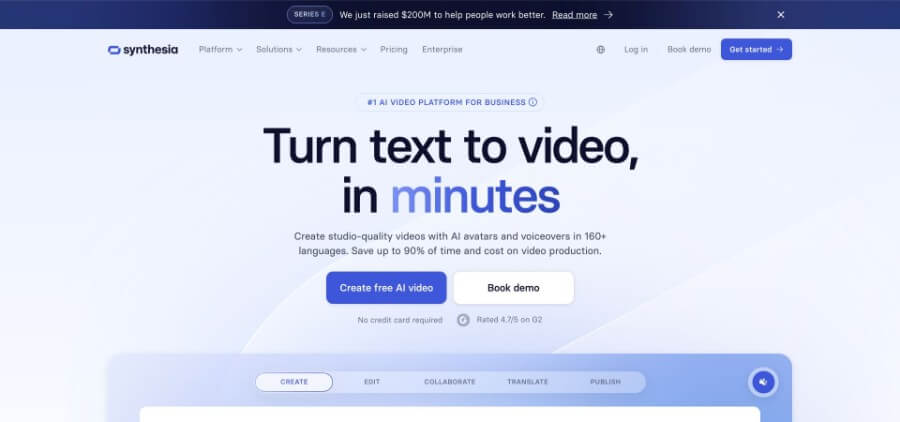
Synthesia AI avatar video creation dashboard screenshot.
Scale is the draw. With support for more than 120 languages and accents, the same video can greet prospects in Tokyo, São Paulo, and Berlin before lunch. Enterprise teams also relax knowing Synthesia holds ISO 27001 and SOC-2 certifications, a level of compliance that reassures legal and IT.
The slide-based editor mirrors PowerPoint, so anyone who can build a deck can craft a two-minute story. Add background images, overlay callouts, or switch camera angles to keep energy high. You can also incorporate background music to complement visuals and maintain viewer interest. Higher-tier plans even allow custom AI avatar generation of real team members, so your CEO can welcome users in every market without a studio.
Pricing starts near the cost of a stock-footage subscription, but minutes disappear quickly on lower tiers. Treat Synthesia as a human-face generator rather than a full motion-graphics suite, pair the avatar footage with B-roll or screenshots in your editor, and your next explainer can land in inboxes while competitors are still booking lighting.
3 HeyGen: wallet-friendly avatars with a built-in copywriter
HeyGen delivers avatar videos at a price even startup budgets accept. Open the studio, pick from more than 120 avatars, or clone your own voice for instant authenticity. If the page is blank, tap the GPT-powered script button and the platform drafts a tight outline in seconds.
Speed stands out. A one-minute segment renders in two to three minutes, so a full two-minute video is ready before your meeting reminder pings. Lip-sync feels natural, down to subtle eye blinks that reinforce the illusion.
Templates cover common needs such as product demos, LinkedIn updates, and sales pitches, helping users skip the blank-canvas pause and create videos that effectively showcase a product’s features and benefits. Branding controls let you add logos, switch fonts, and lock house colors, so every export matches your guide even if an intern drives the process.
Cost seals the deal. Plans start at about $24 per month, and the included free credit lets you test a real video, watermark aside. That mix makes HeyGen a practical pick for teams that need volume without enterprise rates.
Reach for HeyGen when you want avatar-driven content at scale. Pair the AI scriptwriter with your voice clone, and you can push localized updates or personalized sales reels while rivals adjust webcam lighting.
4 Runway Gen-2 and Gen-4: an AI video generator sandbox for surreal B-roll
Runway is where marketers turn when stock clips feel stale and budgets cannot cover a custom shoot. Type a prompt such as “neon city skyline at dawn,” and the model returns a six-second clip that did not exist a moment earlier. Need more story? Stack prompts in the storyboard view, adjust each scene in a chat-style thread, and Gen-4 keeps characters, lighting, and camera angles surprisingly consistent.
Runway is particularly useful for communicating complex ideas in a visually engaging way, making it ideal for animated marketing videos that need to simplify and explain intricate concepts.
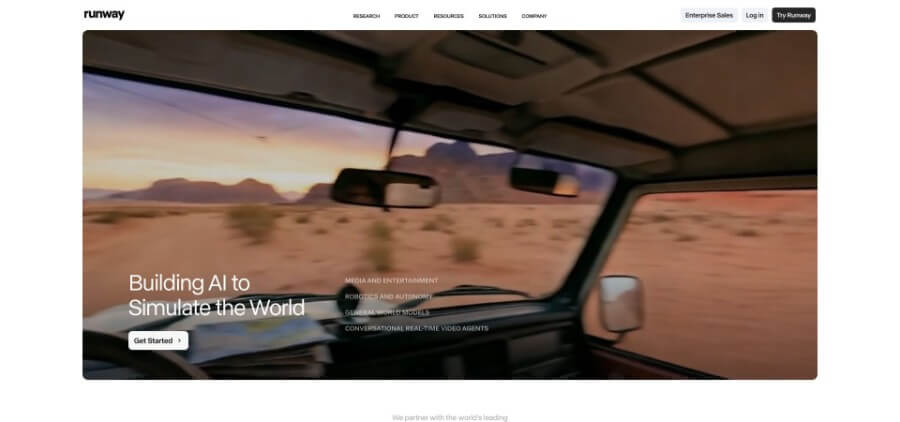
Runway Gen-2 and Gen-4 AI video generation workspace screenshot.
Picture Photoshop for moving pictures. One minute you are turning a plain product shot into an alien landscape; the next you are erasing a logo with text-based in-painting. The interface favors experimentation, so expect a short learning curve. The payoff appears once you realise every prompt can rewrite reality.
Trade-offs remain. Purely generative clips stay short, so crafting a full two-minute spot means stitching scenes in Runway’s editor or your own NLE. Credits disappear quickly at higher resolutions. Still, no other tool in this list delivers cinema-grade effects on a Tuesday afternoon using little more than a keyboard.
5 Pictory: turn blogs into bite-sized video in minutes
Pictory helps content marketers convert long-form copy into video with almost no manual editing. Paste a URL or a script, and the AI skims key sentences, pairs each with stock footage, and adds animated captions. About ten minutes later you have a two-minute highlight reel ready for LinkedIn, complete with royalty-free music.
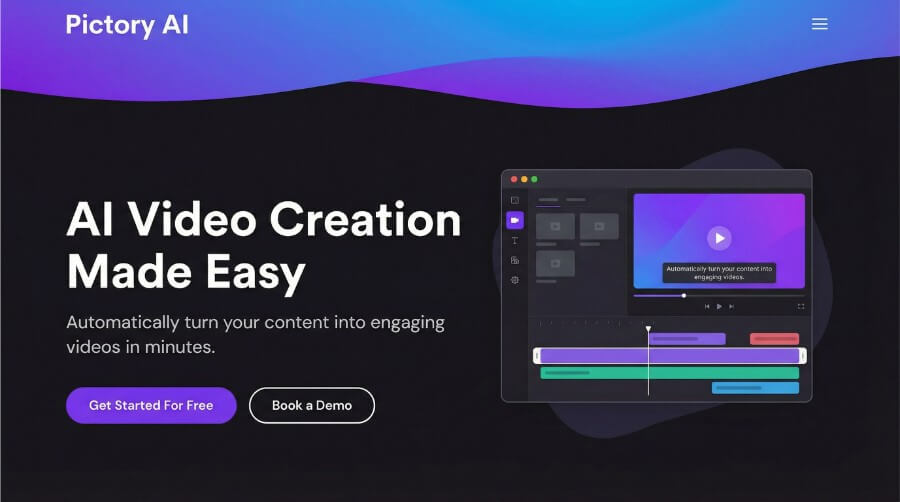
Pictory blog-to-video automation workflow screenshot.
Automation drives the experience. The engine suggests scene breaks, searches a library of roughly 16 million assets, and can voice the narration if you prefer not to record. You still control the final cut: swap clips, adjust text overlays, or change aspect ratio for TikTok in two clicks.
Pricing is straightforward. The starter plan produces up to 30 videos a month at a cost that works out to only cents per finished minute, and exports are free of watermarks.
Turn to Pictory when thought-leadership articles need a visual hook or when the social team needs more video without extra headcount. Feed it words and watch static paragraphs move. Pictory also enables marketers to repurpose content from blogs and articles into engaging animated marketing videos for various platforms, making it easy to maximize reach across multiple channels.
6 InVideo AI: template-driven social videos at scale
InVideo blends the ease of Canva with the timeline control of Premiere. Choose a template (hundreds fit every major network), type a prompt, and the AI fills scenes with stock footage, text animations, and a voice-over placeholder. Skim the storyboard, swap a clip, adjust a headline, and export. With a library of about 16 million assets, you rarely search elsewhere for B-roll.
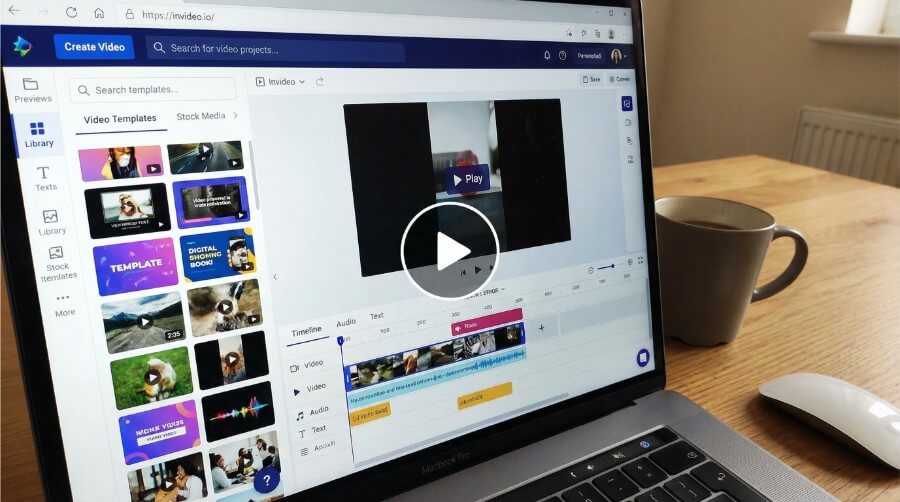
InVideo AI template-based social video editor screenshot.
Teams value the brand-kit feature. Load your logo, colors, and fonts once, and every new video follows house style. InVideo AI also enables users to tailor content to different audience segments and social media platforms, making it easy to customize messaging for specific viewers. That consistency turns junior marketers into reliable producers. Unlimited exports on the $15 plan let you fill the calendar with product teasers, testimonials, and event promos without tracking credits.
InVideo shines when speed and volume matter more than cinematic polish. If the plan calls for three fresh videos a week, this factory line keeps the feed active.
7 Vyond with Vyond Go: animated storytelling without an animator
If your message needs a bit of character acting, such as a playful product explainer or a policy walk-through, Vyond provides the stage. Open the editor, type a prompt into Vyond Go, and the AI drafts a scene sequence with characters, props, and voice-overs. It feels like handing an outline to a storyboard artist and getting thumbnails back almost instantly.
From there you add polish. Drag characters, sync gestures to dialogue, and replace the default voice with your own recording for added authenticity. Because each asset is vector-based, you can extend a scene to any length without losing clarity, making it ideal for multi-minute explainers that blend charts, callouts, and humor.
Brand teams will welcome the detail controls. Load a custom color palette, create avatars that match real colleagues, and save reusable templates. Many Fortune-level L&D departments rely on Vyond’s governance tools, so marketing can borrow the same safeguards.
The price sits higher than simple template tools, but unlimited exports and native long-form timelines justify the cost for companies that treat video as a core channel. When a whiteboard sketch or cartoon hero communicates your value proposition better than a talking head, Vyond offers a studio-quality solution without the storyboard backlog.
Additional Tools for Motion Design and Custom Animation
While AI video generators are great for quickly producing full videos, some teams need more control over animation and visual style. Motion design tools offer greater flexibility when creating branded content, social media visuals, and custom animations.
Jitter
Jitter is a browser-based motion design tool built for creating animated social content and brand visuals quickly. It combines intuitive controls with ready-made animation presets, making it easy to turn static designs into polished motion graphics in just a few clicks. The platform also includes AI-powered features like image-to-video prompting, allowing users to generate motion from static visuals while maintaining full creative control. This makes it ideal for marketers, social media managers, and designers who need high-quality animations without a steep learning curve.
Adobe After Effects
Adobe After Effects is a professional-grade motion design and visual effects tool used across industries. It offers advanced animation capabilities, including keyframing, compositing, and visual effects, but comes with a steeper learning curve that often requires specialized training. It’s best suited for complex projects where full creative flexibility and precision are required.
Canva
Canva includes basic animation features and is widely used for quick, template-based animated content, especially for social media and marketing teams. Its drag-and-drop interface and prebuilt motion templates allow users to produce simple animated graphics without prior design experience.
Rive
Rive is focused on interactive animations for apps and websites, making it ideal for product and UI motion design rather than marketing videos. Designers can create dynamic, state-driven animations that respond to user interactions, which is especially useful for app interfaces, micro-interactions, and embedded web components.
Animaker
Animaker is a versatile, cloud-based animation platform designed for creating videos with a mix of animated characters, infographics, and motion graphics. It offers a rich library of templates, characters, and props, making it easy for teams to produce marketing videos, tutorials, and social media content quickly. Animaker’s drag-and-drop interface and AI-powered features simplify video creation, even for users without prior animation experience, while still offering advanced controls for more detailed projects. This makes it an excellent alternative for companies seeking high-quality animated content without the time investment of traditional animation software.
Frequently asked questions
This article currently has no FAQs.
Conclusion
Let’s turn the idea in your head into a clip your audience will remember.
