
Where to find free social media graphic templates
In business and marketing, you always have to go where your audience is, and that means you should have a presence on all the main Social Media networks such as Facebook, Twitter, Instagram, and Linked-In.
Choose a social template by the message and placement
A free social media template is a starting layout, not a substitute for the publishing brief. Choose one whose structure fits the message, then confirm the current editing and export options on the template page. The original 2019 collection and photo-library counts below are historical references.
Before customizing a layout, answer four questions:
- What should the reader understand from this graphic?
- Where will it appear, and what crop will that placement show?
- Which text, photographs and brand elements are already approved?
- Which file needs to be exported and who will review it?
Try the template with your real content rather than only its attractive sample text. Include a long headline and the actual photograph. If important information does not fit, choose a more suitable composition instead of reducing every type size.
Keep the editable source and note where the included images and fonts came from. Free access to a template does not establish identical reuse conditions for every asset or include a paid automation integration. Check the current offer and the relevant asset information before using it in a campaign.
Use the consultant visual kit to decide which recurring assets you need and the Twitter/X placement checklist to review a short-form post. For repeated data changes, use the graphic-creation guide. The separate embedded-editor handover applies when customers need editing inside your own website.
Practical guidance revised November 1, 2026. Worked examples are illustrative; no campaign performance benchmark was conducted.
Social media is an incredibly important connection tool. Whether you are a business trying to reach out to your target audience or just an individual trying to keep in touch with your old friends, having a compelling and attractive social media page helps you entertain your followers and keep them listening.
But sometimes, when you’re brainstorming your next message to your followers, it can be difficult to find inspiration.
I can’t remember how many times I wanted to post on Instagram but I had no idea what to post. Of course, my objective was to post something that is memorable and share-worthy to my audience but what exactly? No clue.

What better way to find a notable image than by creating your own?
A solution: being inspired by premade templates and create your engaging graphic in a minute with a graphic creation tool designed to be one of the fastest and easiest to use on the market.

Drive more engagement on social networks with the help of professionally designed social media graphic templates.
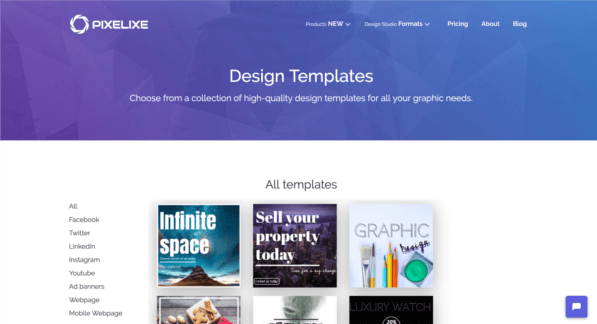
Guess what, we are proud to announce that we recently launched a wide selection of free ready-made templates that will make it easier to stand out on Facebook, Instagram, Twitter, LinkedIn, Youtube and other social media platforms.
Check out this free collection of free graphic templates clicking the link below :
https://pixelixe.com/templates/
The original 2019 guide introduced a free template collection. Confirm the current template, editor and export availability and check the intended placement before using a layout.
How to start creating a social media graphic with Pixelixe templates ?
Really easy, either go directly to https://studio.pixelixe.com/ and choose your favorite format among the preset dimension.
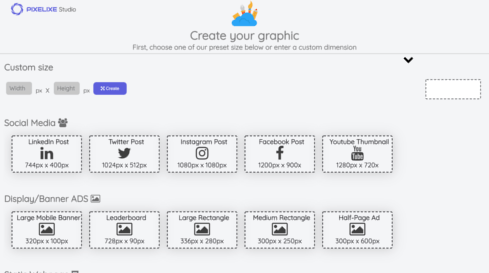
Once you will click on a format, either LinkedIn post, Twitter Post, Instagram Post, Facebook Post or Youtube Thumbnail, you will
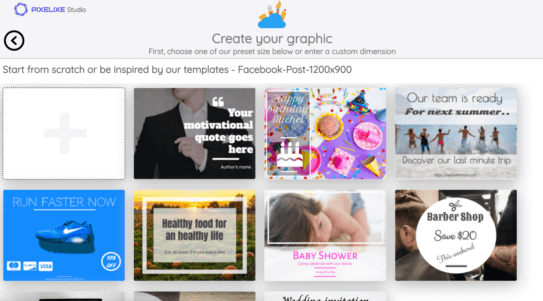
Or directly pick the template of your choice from our dedicated free templates page :
https://pixelixe.com/templates/
Both way will redirect you directly into the online Pixelixe Studio editor :
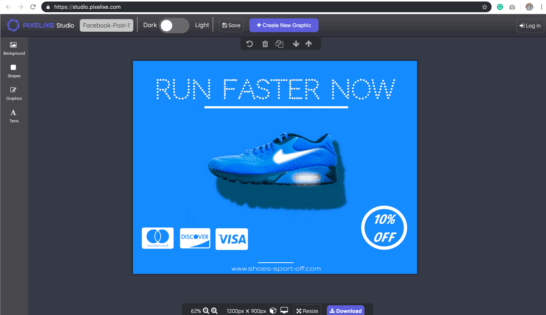
Once you are in the editor, it is really simple to edit your graphic and modify whichever you want. From icon, shape, image, and text (font family, font size, colors, opacity and more) you can tune everything and even background photos. Use the photo assets available in the current editor and check their reuse information. The original 850,000-photo count is historical, not a current inventory guarantee.
Conclusion
It is time for you to drive more engagement on social media with the help of our professionally designed social media graphic templates.
Our Studio has been designed to be ridiculously easy to use and the perfect utility tool for small businesses, marketers, bloggers with no design background at all.
Not convinced, yet, test it right away for free (No account required).